7 Tips to Renew Foreign Worker Insurance Smoothly (Avoid Delays & Rejection)
Renewing foreign worker insurance in Malaysia requires precise timing and zero coverage gaps to avoid Visit Pass -Temporary Employment (VPTE) permit rejection. Unlike first-time SPIKPA insurance purchases during recruitment, renewals demand strict coordination between policy expiry dates, ITR generation windows, and payment processing deadlines.
When SPIKPA renewal is delayed or completed incorrectly, consequences extend beyond administrative inconvenience. The Foreign Workers Centralized Management System (FWCMS) automatically flags coverage gaps during permit verification, immediately blocking renewals until the insurance status is updated.
Workers whose coverage lapses cannot submit claims if medical emergencies occur during the transition period, leaving employers exposed to out-of-pocket hospitalization costs.
This guide explains how to renew foreign worker insurance efficiently with seven actionable tips, covering optimal timing, pre-renewal verification, coverage gap prevention, insurer switching decisions, and bulk workflow optimization for employers managing large workforces.
Key Takeaways
- Start planning 90 days before policy expiry to avoid last-minute complications
- Verify worker status before generating ITR to prevent wasted processing cycles
- Set policy start date to the day after the current policy expires for zero-gap coverage
- Complete payment through a platform like eInsurans that auto-updates FWCMS immediately
- Batch renewals by expiry date if managing 10 or more workers for efficiency
The Importance of Renewal Timing for Foreign Worker Insurance
Foreign worker insurance renewal requires zero coverage gaps to avoid permit rejection. The timing of your renewal directly determines whether FWCMS approves or blocks it.
This zero-gap requirement is strict. Even a single day without active coverage between your old policy’s expiration and your new policy’s start date will automatically trigger FWCMS rejection.
Beyond permit approvals, the stakes are significant. Workers whose coverage lapses during the renewal window cannot submit insurance claims for medical emergencies. Employers face financial exposure for any hospitalizations until the new policy takes effect, as well as potential compliance penalties for the coverage gap.
The coordination challenge adds to this risk. You must align three separate systems:
- FWCMS portal for ITR generation
- The insurance platform for policy purchase
- The payment gateway for processing
During peak renewal periods, delays in any single system cascade into missed deadlines, jeopardizing your entire renewal timeline.
Essential Tips for Efficient SPIKPA IG Renewal
The following seven strategies help employers complete renewals smoothly while avoiding common timing, documentation, and coordination issues.
1. Start Planning 90 Days Before Expiry
Early planning prevents the emergency processing and rushed decisions that often lead to mistakes. At the 90-day mark, complete these planning tasks:
- Review all policy expiry dates in FWCMS to identify which workers need renewal
- Verify worker employment status to exclude resigned or transferred employees
- Ensure a Foreign Workers Medical Examination Monitoring Agency (FOMEMA) medical check-up is carried out and approved.
- Check passport validity for all renewing workers (must have over 12 months remaining)
- Secure budget approval for renewal costs to avoid payment delays
Importance: Starting 90 days ahead gives you enough buffer time to identify issues, coordinate with finance teams, and handle any unexpected complications without rushing through ITR generation or payment processing.
This early timeline is the foundation of how to renew foreign worker insurance without delays or compliance risks.
Benefit: Employers who plan at the 90-day mark reduce duplicate ITR generation, by avoiding last-minute worker status changes and minimize payment failures from insufficient budget preparation.
2. Verify Worker Status Before Generating the ITR
The ITR (Insurance Transaction Reference) locks your worker list for 14 days. Any changes to employment status discovered after ITR generation mean you must wait for the ITR to expire, then generate a new one with the corrected list.
Complete this pre-ITR verification checklist:
- Confirm current employment status for each worker (active vs resigned)
- Check passport expiry dates (workers need minimum 12 months validity)
- Group workers by policy expiry date for efficient batch processing
- Update any changed worker details in FWCMS records before ITR generation
Common mistake: Discovering a worker’s resignation after ITR generation wastes the ITR slot. You cannot cancel or modify an active ITR, forcing you to either pay for coverage you won’t use or wait 14 days to regenerate.
Benefit: One-time verification ensures clean ITR generation with no wasted processing cycles or duplicate payments.
3. Set the Policy Start Date to Avoid Coverage Gaps
The most common SPIKPA renewal mistake happens at the policy start date selection stage. Setting the wrong date creates either a coverage gap or unnecessary overlap.
| Incorrect | Correct |
|---|
| Start date = today’s date | Start date = day after current policy expires |
Example calculation: If your current policy expires on 30 June 2026, set the new SPIKPA IG policy start date to 1 July 2026. This creates seamless, continuous coverage with zero-day gaps.
Impact: FWCMS automatically flags coverage gaps during permit renewal verification. Even a single day without active insurance will block your renewal submission and require you to resolve the issue before proceeding.
Benefit: Setting the correct start date eliminates the need for policy amendments, refund requests, or FWCMS support tickets to resolve coverage continuity issues.
4. Decide Whether to Stay or Switch Insurers
Unlike first-time purchases, where insurer choice is often a default decision, renewal gives you the opportunity to reassess service quality based on 12 months of actual experience.
| Stay with Current Insurer If | Consider Switching If |
|---|
| No claims issues during policy period | Poor claims processing experience |
| Workers familiar with insurer protocols | Service quality declined |
| Corporate account benefits established | New insurer offers better support |
| Bulk renewal discount in place | Administrative simplification needed |
eInsurans advantage: All insurers available through eInsurans (currently Tokio Marine, Lonpac and Generali) offer government-standardized SPIKPA IG coverage. This means coverage benefits are identical across all providers, making your decision purely service-based rather than coverage-based.
All insurers on eInsurans offer the same platform benefits and FWCMS integration regardless of which you choose.
Process note: Switching insurers during renewal doesn’t affect FWCMS compliance or create coverage gaps. The ITR-based purchase process handles insurer transitions automatically without requiring additional documentation.
Action step: Review your claims history and service experience from the past 12 months before making your renewal decision. If claims were processed smoothly and support was responsive, staying with your current insurer maintains operational continuity.
Trusted Foreign Worker Insurance Solutions
Digital SPIKPA IG insurance with seamless FWCMS integration, secure payments, and real human support.
5. Optimize Bulk Renewals for Large Workforces
Bulk renewal (renewing 10 or more workers in a single renewal cycle), requires strategic workflow planning to avoid processing bottlenecks and ITR expiration issues.
Efficiency strategies:
- Group by expiry date: Create renewal batches for workers grouped by pass expiration month. For example, process all June renewals together and all July renewals together, rather than mixing workers with upcoming pass expirations across different months.
- Stagger ITR generation: Generate ITRs for 10 workers at a time, by date(s). This prevents earlier ITRs from expiring while you process later batches.
- Use CSV upload for speed: FWCMS allows bulk worker entry via CSV template (downloadable from the portal), significantly faster than manual entry for large batches.
- Coordinate payment workflows: For payment transactions using – FPX B2B, ensure timely approval via corporate banking maker-checker workflows.
- Assign renewal coordinator: Designate a single point person to track ITR status, payment completion, and FWCMS updates across all renewal batches. This prevents coordination failures when multiple team members handle different batches.
Common bulk mistake: Attempting to generate a single ITR for more than 50 workers with mixed expiry dates. FWCMS limits each ITR submission to 10 workers, requiring you to break down large groups anyway. Proper pre-planning avoids multiple frustrating resubmissions.
Time saving: Employers who implement a proper batching strategy reduce admin time by 40 to 60 percent compared to ad-hoc individual renewals processed as workers approach expiry.
Renew through eInsurans for Faster FWCMS Integration
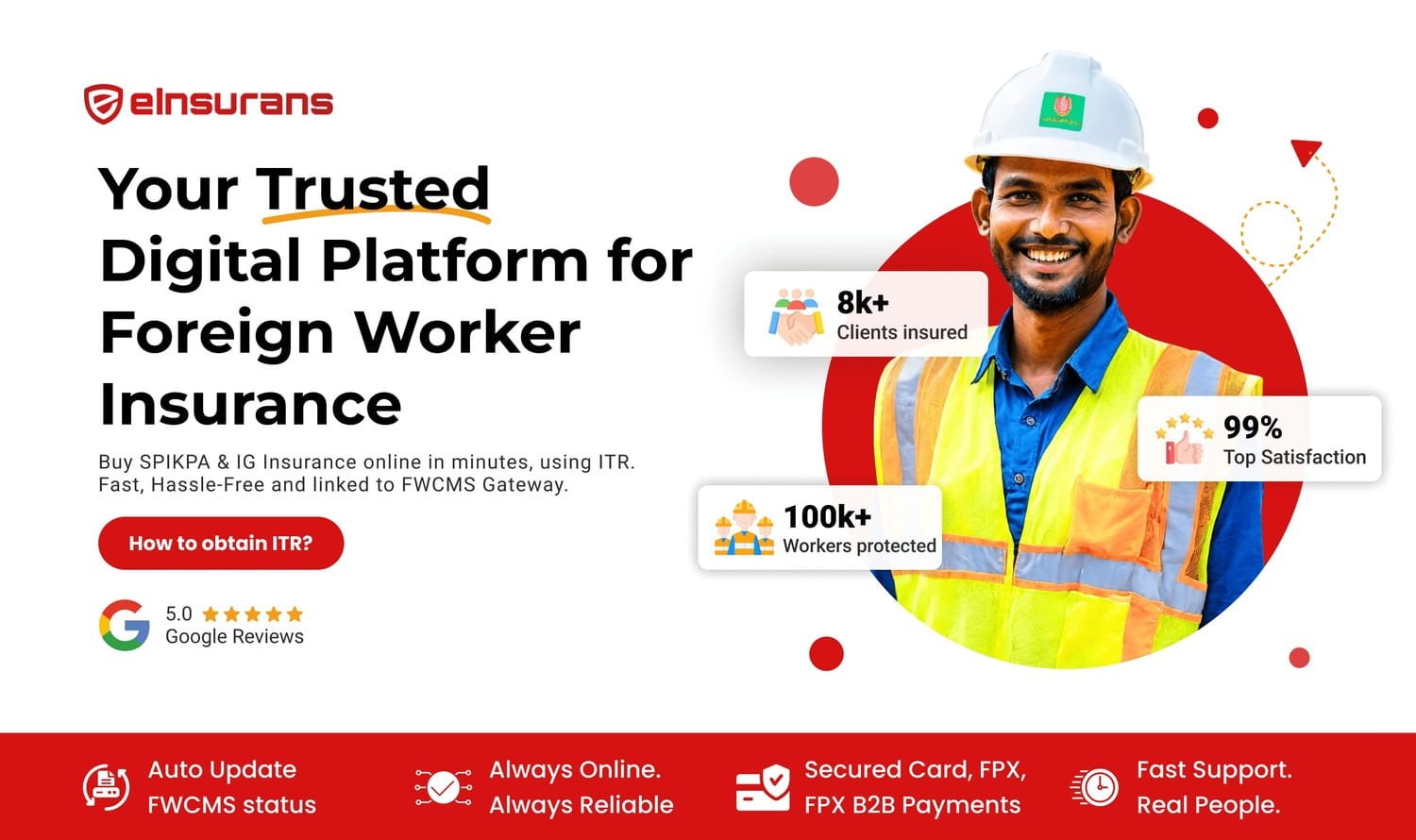
Why use eInsurans for foreign worker insurance renewals instead of other methods?
- Faster FWCMS sync: Faster insurance status updates, compared to 24 to 48 hours through direct portal processing
- 99.9% uptime: Built on Financial Link infrastructure, eInsurans remains accessible during peak renewal periods when other methods experience slowdowns
- FPX B2B support: Corporate payment workflows with maker-checker approval processes integrate seamlessly
- Insurance-specific support: Support team familiar with renewal timing issues and FWCMS coordination challenges
Our renewal purchase process follows the same ITR-based workflow as first-time purchases.
For the complete step-by-step ITR generation and payment process, see our FWCMS insurance purchase guide.
Verify FWCMS Status Immediately After Payment
Payment completion doesn’t guarantee immediate FWCMS status updates. System sync timing varies, making post-payment verification a critical final step.
Post-payment verification process:
- Wait 10 minutes to a few hours for system sync to complete
- Log back into the FWCMS portal
- Check your insurance purchase status in the renewal application
- Confirm status shows “Insurance Purchased” or “Pending JIM Approval”
Troubleshooting: If your status remains “ITR Generated” after 2 hours, contact eInsurans support immediately via WhatsApp. Our support team can verify payment status and escalate sync issues before they affect your permit renewal deadline.
Benefit: Catching sync issues within hours rather than days keeps you within your renewal deadline window. Waiting until the last day to discover a sync problem leaves no time to resolve it.
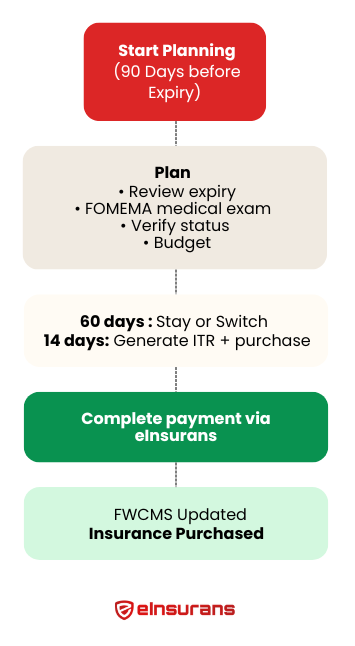
SPIKPA IG Renewal Checklist
Use eInsurans’ timeline-based checklist to track your renewal progress:
90 Days Before Expiry:
60 Days Before Expiry:
14 Days Before Expiry (ITR Window):
After Payment:
What If You're Already Late?
If you’ve already passed your policy expiry date, take these emergency steps immediately:
- Generate late renewal ITR: FWCMS still allows ITR generation after expiry, but your workers are technically uninsured during the gap period
- Purchase immediately: Complete payment the same day to minimize the coverage gap duration
- Document the gap: Record exact dates when coverage lapsed for internal compliance tracking
- Restrict work activities: Consider restricting high-risk work activities until new coverage activates
- Communicate with workers: Inform affected workers that they should avoid non-emergency medical visits until the new policy takes effect
Important: Late renewals create retroactive coverage gaps that cannot be filled. The new policy only provides coverage from its start date forward, meaning any medical incidents during the gap period remain uncovered.
Renew Worker Insurance Efficiently with eInsurans
Understanding how to renew foreign worker insurance efficiently requires systems that prevent last-minute rushes and reduce administrative overhead.
The seven tips in this guide form a complete renewal framework: early planning (90 days), pre-ITR verification, zero-gap start date calculation, strategic insurer decisions, bulk optimization, reliable platform selection, and post-payment verification.
The most critical actions are to start at the 90-day mark and set the correct policy start date. These two steps alone eliminate the majority of renewal problems employers face, from permit rejections to coverage gaps to FWCMS sync failures.
Ready to start your renewal? Purchase your SPIKPA renewal through eInsurans for faster processing and automatic FWCMS updates.
Trusted Foreign Worker Insurance Solutions
Digital SPIKPA IG insurance with seamless FWCMS integration, secure payments, and real human support.