
10 Foreign Worker Recruitment Mistakes Malaysian Employers Make
If you’ve ever had a foreign worker permit rejected without a clear explanation, or watched your project timeline slip while waiting for approvals that should have been routine, you’re not alone.
The Malaysian foreign worker recruitment process through FWCMS involves coordination across multiple agencies: MOHR, Immigration (JIM), and FOMEMA. Mistakes at any stage can stall your entire operation.
Here’s what we’ve learned from processing thousands of foreign worker insurance transactions: recruitment failures in Malaysia typically cluster at five critical stages: quota application, VDR submission, worker arrival, FOMEMA medical, and insurance/permit issuance.
The costliest errors aren’t during recruitment itself. They’re documentation failures and insurance timing mistakes that trigger permit rejections, repatriation costs, and in serious cases, company blacklisting.
The good news: every common mistake has a specific prevention step.
Below, we’ll walk through each mistake by process stage, so you know exactly where to focus your attention. For a complete overview of the foreign worker permit renewal process, see our step-by-step guide.
But first, let’s confirm this article is right for your situation.
Do You Recognise These Symptoms?
Here’s how to know if these mistakes are affecting your operations:
- Permit applications rejected without clear explanation
- Workers delayed at airport due to documentation issues
- Unexpected repatriation costs after FOMEMA failures
- Insurance coverage gaps discovered during permit renewal
- FWCMS system errors or timeouts during critical application periods
- Confusion about which documents go to which agency (MOHR vs JIM vs FOMEMA)
- Budget overruns from permit processing delays
If two or more of these sound familiar, keep reading. Every one of these is preventable once you know where the risks actually hide.
The 7 Stages of Hiring Foreign Workers in Malaysia
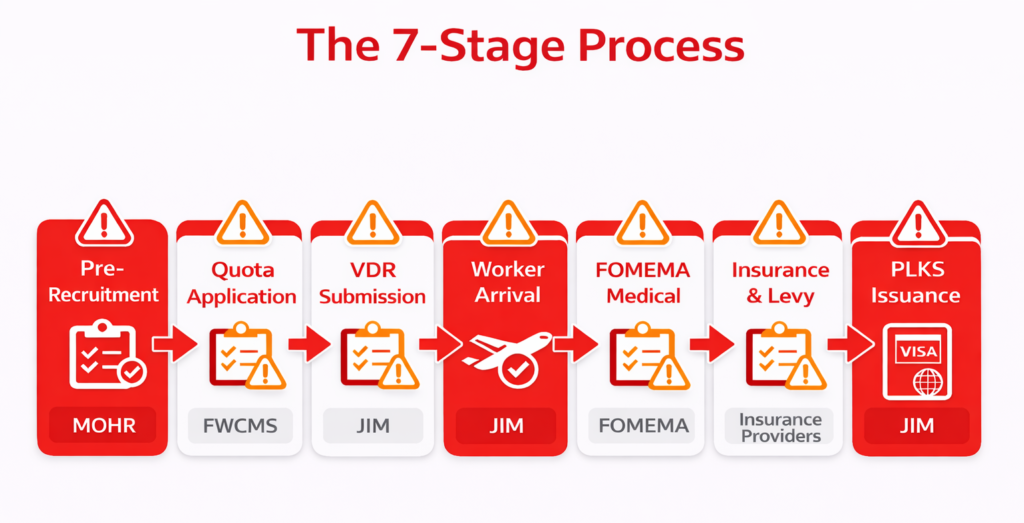
The 7-Stage Process
Foreign worker recruitment in Malaysia follows a defined sequence:
- Pre-Recruitment (employer eligibility, sector verification)
- Quota Application (FWCMS approval)
- VDR Submission (Visa with Reference application)
- Worker Arrival (immigration clearance)
- FOMEMA Medical (health screening)
- Insurance & Levy (SPIKPA IG purchase, levy payment)
- PLKS Issuance (final permit)
Multi-Agency Coordination
The process requires coordination with several agencies, with FWCMS now handling quota approval and calling visa issuance, OSC (One Stop Centre) serving as the coordinating body between agencies, Immigration (JIM) overseeing permits, and FOMEMA managing medical clearance.
The FWCMS portal integrates much of this, but each agency has its own requirements and timelines.
Employers often assume one agency “handles everything.” They don’t. Documents acceptable to MOHR may not meet JIM requirements.
This is where having the right insurance partner matters. eInsurans connects directly to FWCMS via API, so your insurance status updates automatically without manual uploads or follow-ups.
When something stalls, our support team understands both insurance requirements and FWCMS workflows, so you get answers that actually move your application forward, not generic replies that send you in circles.
Where Mistakes Actually Cluster
Here’s what most employers miss: the recruitment itself, finding and selecting workers, is rarely where things go wrong.
Documentation failures cause the majority of costly mistakes. The “paperwork” stages are where real risks hide.
Let’s walk through each stage and the specific mistakes that delay applications.
The 10 Most Common Mistakes (By Process Stage)
Stage 1: Pre-Recruitment
Mistake #1: Skipping Local Hiring Verification (MyFutureJobs)
Before applying to hire foreign workers, employers must advertise positions on MyFutureJobs for at least 14 days. This proves that no suitable local candidates are available for the role.
Why does it cause rejections?
MOHR checks MyFutureJobs records during quota approval. If there’s no job posting record, or if the posting period was shorter than 14 days, the quota application is rejected. No exceptions.
How to avoid it:
- Post job openings on MyFutureJobs before starting the foreign worker application process
- Ensure the posting runs for the full 14-day period
- Document all local applicant responses (or lack thereof)
- Keep screenshots or records of the posting as backup evidence
Red flag to watch: If you can’t produce a MyFutureJobs posting record when asked, your application will stall.
Stage 2: Quota Application
Mistake #2: Applying for the Wrong Sector Quota
Each approved sector (manufacturing, construction, plantation, services, agriculture, mining) has different quota rules, levy rates, and source country restrictions. Quotas are not interchangeable.
Why does it cause rejections?
A quota approved for manufacturing cannot be used to employ construction workers. Indonesian workers are restricted from certain sectors. A mismatch between your business registration and the sector you’re applying for triggers rejection.
How to avoid it:
- Verify your business registration (SSM) matches the sector you’re applying for
- Confirm source country eligibility before recruitment begins (Indonesia, Nepal, Bangladesh, Myanmar, India, etc. have different sector permissions)
- If operating across multiple sectors, apply for separate quotas for each
Red flag to watch: Business registration says “manufacturing” but you’re trying to hire for construction work.
Stage 3: VDR Submission
Mistake #3: Document Expiry or Mismatch Errors
The Visa with Reference (VDR) application requires precise documentation. Passport validity, photo specifications, and name consistency across all documents must meet Immigration Department (JIM) requirements exactly.
Why does it cause rejections?
- Passport must be valid for at least 18 months from the application date
- Photos must meet specific size, background, and recency requirements
- Name spelling must match exactly across passport, medical reports, employment contract, and FWCMS application
- Even minor discrepancies (e.g., “Mohammad” vs “Muhammad”) trigger verification failures
How to avoid it:
- Create a document verification checklist and use it for every worker
- Verify passport expiry dates before recruitment. Reject candidates whose passports expire within 18 months
- Ensure name transliteration is consistent across all documents (decide on one spelling and use it everywhere)
- Use clear, recent photos that meet JIM specifications
Red flag to watch: Name appears differently on passport vs medical report.
Mistake #4: Selecting “Online Purchase Insurance” Instead of “Offline Purchase” in FWCMS
When processing applications in FWCMS, employers are presented with two insurance purchase options. “Online Purchase” routes you to the internal FWCMS insurance panel. “Offline Purchase Insurance – Self Insurance Purchase” generates an ITR (Insurance Transaction Reference) number, allowing you to purchase through external platforms such as eInsurans.
Why does it cause rejections?
- The internal FWCMS panel experiences frequent system downtime, especially during peak periods
- Selecting “Online Purchase” may result in accidentally purchasing from providers you didn’t intend to use
- Some employers don’t realize they’ve selected the wrong option until payment is already complete
How to avoid it:
- Always select “Offline Purchase Insurance – Self Insurance Purchase” in FWCMS
- Generate your ITR number from the system
- Complete your purchase through your preferred platform. See our guide on how to purchase FWCMS insurance via eInsurans
If you have already made this mistake:
If payment hasn’t been completed, you can usually cancel and restart the process. If payment was completed through the internal panel, contact the assigned insurer directly to discuss your options.
Red flag to watch: You’re redirected to an unfamiliar insurance provider’s payment page.
Stage 4: Worker Arrival
Mistake #5: Missing the 24-Hour Immigration Clearance Window
Employers must complete immigration arrival clearance within 24 hours of the worker landing in Malaysia. This is a strict regulatory requirement, not a guideline.
Why does it cause rejections?
- Missing this window triggers compliance flags on your company’s record
- Repeated violations can affect the approval of future applications
- Workers may be held or face complications if clearance isn’t completed promptly
How to avoid it:
- Assign a specific person responsible for airport coordination
- Have all arrival documents prepared and verified before the flight lands
- Know your nearest immigration checkpoint and its operating hours
- Build buffer time into your arrival process. Don’t schedule arrivals for late Friday evening
Red flag to watch: No one from your team is available to handle arrivals on the scheduled date.
Mistake #6: Incomplete Arrival Documentation
Workers must present specific documents at entry: a valid passport with VDR endorsement, a Calling Visa, an employment contract, and proof of insurance coverage.
Why does it cause rejections?
- Missing documents mean workers are held at immigration for verification
- Worst case: workers are denied entry and sent back on the next available flight, at the employer’s expense
- Even temporary holds cause downstream delays in FOMEMA scheduling and permit processing
How to avoid it:
- Create a standardized arrival document packet for each worker
- Verify packet completeness before departure from the source country
- Have backup copies accessible electronically (cloud storage, email)
- Brief workers on what documents they must carry and present
Red flag to watch: Worker arrives without their Calling Visa or employment contract copy.
Stage 5: FOMEMA Medical
Mistake #7: Not Understanding FOMEMA Failure Consequences
All foreign workers must pass the FOMEMA medical examination within 30 days of arrival in Malaysia. Failure means mandatory repatriation. There is no appeal process for medical failures.
Why it’s costly:
- Repatriation costs: RM1,500-4,000 per worker depending on source country (airfare, Check Out Memo processing, handling fees). Employer bears this cost entirely.
- Insurance Guarantee (IG) claim: Your IG deposit can only be claimed after completing proper repatriation documentation
- Sunk costs: Recruitment agency fees, training investment, and onboarding time are lost
- Workforce planning disruption: Projects that depend on the worker are delayed
Common FOMEMA failure causes:
Tuberculosis, Hepatitis B, HIV, drug use, pregnancy
How to minimize risk:
- Require pre-departure medical screening in the source country (not mandatory, but significantly reduces risk)
- Work with recruitment agencies that conduct preliminary health checks as standard practice
- Factor potential FOMEMA failures into workforce planning. Industry average is 2-5% failure rate
- Budget for contingency: if hiring 100 workers, budget for 2-5 potential repatriation cases
Red flag to watch: Your recruitment agency doesn’t conduct any pre-departure health screening.
Stage 6: Insurance & Levy
Mistake #8: Confusing SPIKPA and IG (They’re Two Separate Insurances)
Malaysian employers must secure two separate mandatory coverages for each foreign worker, and they serve completely different purposes:
| Coverage | Full Name | Purpose |
|---|---|---|
| FWHS / SPIKPA | Foreign Worker Hospitalization Scheme | Covers medical treatment and hospitalization expenses during employment |
| FWIG / IG | Foreign Worker Insurance Guarantee | A legally binding insurance guarantee required by Immigration Malaysia, ensuring employers meet their obligations and covering repatriation costs if a worker breaches regulations. |
Why confusion causes delays:
- Submitting only one coverage when both are required
- Using wrong policy numbers in FWCMS (SPIKPA number where IG number is needed, or vice versa)
- Misunderstanding coverage periods. SPIKPA and IG must have aligned validity dates
- Purchasing from different providers with mismatched terms
How to avoid it:
- Understand the distinction clearly. See our detailed guide on types of foreign worker insurance (FWIG vs FWHS)
- When purchasing, always confirm you’re getting both coverages. Platforms like eInsurans bundle SPIKPA and IG together, so you don’t have to worry about missing one.
- Verify policy numbers match what’s required in each FWCMS field
- Understand what Insurance Guarantee (FWIG) covers and why it’s separate from hospitalization coverage
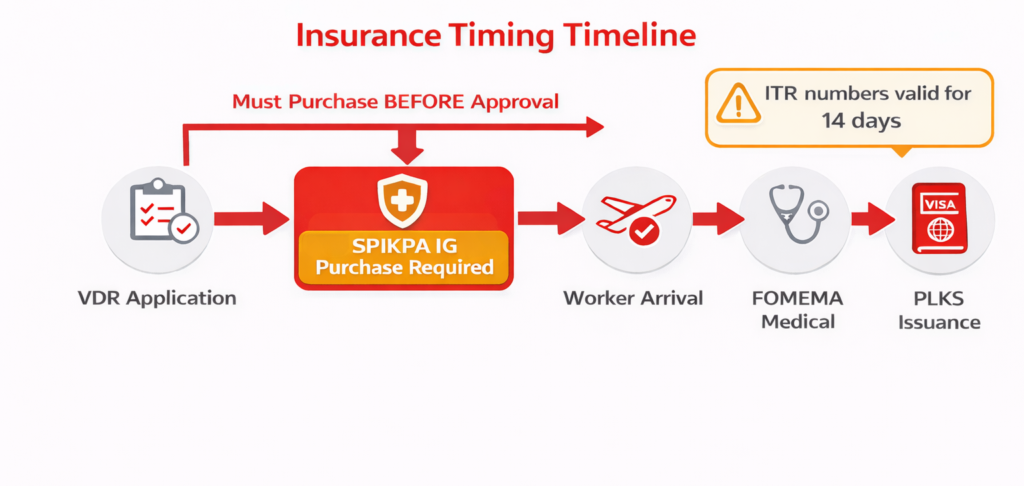
Mistake #9: Wrong Insurance Timing
Insurance must be secured at specific points in the FWCMS process. “Buy it sometime before the permit expires” is not a strategy. It’s a recipe for delays.
Critical timing requirements:
- For new workers: Insurance must be in place before VDR approval can proceed
- For renewals: Insurance must be active before current permit expires, not on the expiry date, not after
- Peak periods: Year-end and pre-holiday periods see system slowdowns; buying last-minute during these windows is high-risk
Why late purchase causes problems:
- FWCMS will not proceed to the next stage without valid insurance
- System load during peak periods can delay even routine transactions
- Expired coverage during renewal creates a compliance gap that complicates permit processing
How to avoid it:
- Purchase insurance early in the process. Don’t wait until the last step
- Use platforms that integrate with FWCMS for faster processing
- For timing considerations, see buying insurance online vs agent
- Avoid peak-period last-minute purchases; build buffer time into your renewal calendar
eInsurans processes insurance purchases with instant FWCMS status updates, so you’re not waiting 24-48 hours wondering if your transaction went through.
During peak periods when the internal FWCMS panel slows down or times out, our platform remains accessible because we operate on separate infrastructure powered by Financial Link.
Stage 7: PLKS (Pas Lawatan Kerja Sementara) Issuance
Mistake #10: Assuming Permit Issuance is Automatic After FOMEMA
Passing FOMEMA is necessary but not sufficient for PLKS issuance. Several other requirements must be satisfied, and any outstanding issue can block final permit approval.
Common blockers:
- Outstanding levy payments: Check FWCMS for payment status before expecting permit issuance
- Insurance coverage gaps: Policy expired between FOMEMA and PLKS processing, or coverage dates don’t align with permit period
- Incomplete SOCSO registration: Mandatory requirement; missing registration blocks permit
- Document verification failures: Immigration flags on documentation inconsistencies
How to avoid it:
Before expecting PLKS issuance, verify:
- All levy payments are current (check FWCMS dashboard)
- Insurance (SPIKPA + IG) is active with dates covering the full permit period
- SOCSO registration is complete
- No outstanding flags or queries in FWCMS
Red flag to watch: FWCMS status shows “Pending” for more than 5 business days after FOMEMA pass.
Trusted Foreign Worker Insurance Solutions
Digital SPIKPA IG insurance with seamless FWCMS integration, secure payments, and real human support.

Mistake Prevention Checklist: The Complete Picture
| No | Mistake | Stage | Prevention Step | Red Flag |
|---|---|---|---|---|
| 1 | Skipping MyFutureJobs verification | Quota | Post jobs 14 days before applying; keep posting records | No job posting documentation |
| 2 | Wrong sector quota | Quota | Verify SSM matches sector; confirm source country eligibility | Business registration mismatch |
| 3 | Document expiry/mismatch | VDR | Use verification checklist; ensure 18-month passport validity; consistent name spelling | Name inconsistencies across documents |
| 4 | Wrong insurance selection (Online vs Offline) | VDR | Always select “Offline Purchase”; generate ITR; use preferred platform | Redirected to unfamiliar payment page |
| 5 | Missing 24-hour arrival clearance | Arrival | Assign airport coordinator; prepare documents before landing | No one available for arrivals |
| 6 | Incomplete arrival documents | Arrival | Create document packets; verify before source country departure | Missing Calling Visa or contract |
| 7 | FOMEMA failure unpreparedness | Medical | Require pre-departure screening; factor 2-5% failure rate into planning | No contingency budget |
| 8 | SPIKPA/IG confusion | Insurance | Understand both are required; verify correct policy numbers | Only one coverage purchased |
| 9 | Wrong insurance timing | Insurance | Purchase early; avoid peak periods; use FWCMS-integrated platforms | Last-minute purchase attempts |
| 10 | Assuming auto-issuance after FOMEMA | PLKS | Verify levy, insurance, SOCSO before expecting permit | “Pending” status beyond 5 days |
Save this table. Share it with your HR team. Check it before every application batch.
The Consequences: What's Really at Stake
| Violation Type | Relevant Law | Potential Penalty |
|---|---|---|
| Employing foreign worker without valid permit | Immigration Act 1959/63 | Fine RM10,000–50,000 per worker and/or imprisonment up to 12 months |
| Repeat or serious violations | Immigration Act 1959/63 | Fine up to RM100,000 and/or imprisonment up to 5 years |
| Failure to repatriate worker | Immigration Act 1959/63 | Forfeiture of security bond (IG); potential blacklisting |
| Non-compliance with employment regulations | Employment Act 1955 | Fines; labor department enforcement action |
| Company blacklisting | MOHR/JIM administrative policy | Permanent ban from hiring foreign workers |
The financial penalties are significant. But blacklisting is the real risk. It permanently removes your ability to hire foreign workers.
For businesses that depend on foreign labor, that’s an existential threat.
The good news: these consequences are for violations, not honest mistakes. If you catch and correct errors before they become violations, which this guide helps you do, the regulatory system works with you, not against you.
Managing the Process Yourself vs Getting Support
Not every situation requires expert help, but some definitely do. Here’s how to know which applies to you.
Handle It Yourself If:
- You’re hiring fewer than 20 workers in a single sector
- All documents are complete, verified, and consistent
- You have prior experience with the FWCMS process
- Your timeline allows buffer for learning curves and potential resubmissions
Get Expert Help If:
- You’re managing 50+ workers or operating across multiple sectors
- You’ve had applications rejected and don’t understand why
- You’re encountering FWCMS system errors or unclear status messages
- Insurance timing or coverage questions are stalling your process
- You’re approaching a deadline with no room for error
Not sure which category you fall into? Talk to our team and we’ll help you figure out the best approach for your situation.
What We Check First
When employers contact us about stalled applications, we check three things first:
- Did you select “Offline Purchase Insurance – Self insurance purchase”?
- Are both SPIKPA and IG active with matching validity dates?
- Are there outstanding levy payments in FWCMS?
These three issues account for the majority of preventable delays. Check them yourself before assuming the problem is more complex.
What This Looks Like in Practice
Scenario 1: The Wrong Selection
A manufacturing company with 150 workers experienced repeated VDR rejections over three months. Their HR team was selecting “Online Purchase” in FWCMS, thinking it was the faster option.
Once they switched to “Offline Purchase Insurance – Self Insurance Purchase” and completed transactions through eInsurans, the rejections stopped.
Total time lost to the original mistake: approximately 6 weeks across multiple worker batches.
Scenario 2: The Missing Screening
A construction firm faced RM12,000 in unexpected repatriation costs when three workers failed FOMEMA in a single quarter.
After implementing pre-departure medical screening as a standard requirement with their recruitment agency, their FOMEMA failure rate dropped from approximately 5% to under 1%.
The screening cost was a fraction of the repatriation expenses they’d been absorbing.
The Pattern
Most recruitment failures trace back to process errors: wrong selections, missed timing, incomplete verification. These aren’t people problems; they’re system problems. Fix the system, and the mistakes disappear.
This is exactly why employers with 50+ workers choose eInsurans. Instead of manually tracking ITR expiry dates, chasing payment confirmations, or troubleshooting FWCMS errors alone, they use a platform built specifically for foreign worker insurance compliance.
One less system problem to worry about.
Why eInsurans
eInsurans is Malaysia’s trusted digital platform for foreign worker insurance. Here’s why businesses choose us:
- Auto-Update with FWCMS: Insurance purchases are automatically reflected in the government system for smooth permit renewals
- Always Online, Always Reliable: Powered by Financial Link, the industry’s most trusted insurance gateway, ensuring fast and stable access
- Secure and Flexible Payments: Support payment via Card, FPX, or FPX B2B, perfect for businesses of all scales
- Fast Support, Real People: Our specialists provide expert guidance on insurance and FWCMS permit queries
- Trusted by 8,000+ Employers: Serving clients from diverse industries, including retail, manufacturing, and construction
Conclusion
You started this article worried about what might go wrong with your next foreign worker application.
Now you have the complete picture: 10 specific mistakes mapped to each process stage, with prevention steps for each.
Most recruitment failures are process errors, and process errors are fixable. The employers who avoid these mistakes aren’t luckier or better connected. They just know where to look.