How to Submit a Claim for Foreign Worker Insurance (SPIKPA IG)?
Picture this: one of your foreign workers falls seriously ill on a Monday morning. You know you’ve paid for SPIKPA IG insurance, but when it’s time to actually use it, you’re not sure where to start.
It’s a common situation. Many Malaysian employers buy SPIKPA (also known as FWHS) because it is compulsory for all foreign workers. However, very few people understand the claims process until they face an actual emergency.
This article walks you through exactly how to claim foreign worker insurance step by step, including what documents you’ll need, which hospitals qualify, and the common mistakes that slow down your reimbursement.
What Is SPIKPA IG?
SPIKPA stands for Skim Perlindungan Insurans Kesihatan Pekerja Asing, which is a compulsory insurance scheme for foreign workers in Malaysia. It helps cover eligible hospitalisation and surgical costs when a worker is admitted to a Malaysian Government hospital.
Insurance Guarantee (IG) is a separate mandatory requirement under the Immigration Department. It serves as a security bond for foreign workers employed in Malaysia.
Together, SPIKPA IG refers to two important protections that employers must arrange. SPIKPA helps with eligible medical costs, while IG helps employers meet immigration requirements and stay compliant.
Understanding SPIKPA IG: Coverage and Exclusions
SPIKPA helps cover essential hospitalisation and surgical expenses for foreign workers in Malaysia when they are admitted to eligible Malaysian Government hospitals. This makes it an important protection plan for employers, especially when unexpected medical treatment is needed.
What SPIKPA Covers
SPIKPA usually covers the following medical and hospital-related costs:
- Daily hospital room and board for in-patient stays, up to 30 days
- Intensive Care Unit (ICU) coverage for medically necessary treatment, up to 15 days per admission
- Hospital supplies and services, including nursing care, prescribed medicines, lab tests, X-rays, physiotherapy, and other essential hospital services
- Surgical operating theatre charges for medically necessary surgeries during hospital stays
- Surgical fees charged by qualified specialists during hospitalisation
- Anaesthesia fees for surgery provided by certified anaesthetists
- General physician visits during non-surgical hospital stays, up to 30 days
- Specialist consultation visits are recommended by a doctor while the worker is admitted, up to 30 days
- Ambulance and medical report fees, including domestic ambulance services and medical reports needed for claims
- Annual coverage limits of up to RM10,000 to RM20,000, depending on the policy
What SPIKPA Does Not Cover
Although SPIKPA offers important medical protection, there are also several exclusions that employers should be aware of:
- Emergency outpatient treatment, as SPIKPA generally requires the foreign worker to be admitted as an in-patient
- Death benefits, which are not included under SPIKPA
- Injuries caused by fights, illegal activities, or criminal acts
- Total Permanent Disability (TPD), which is not covered under this policy
Understanding both the coverage and exclusions under SPIKPA can help employers avoid confusion, prepare the right documents, and submit a smoother foreign worker insurance claim in Malaysia.
Step-by-Step Guide to Claiming SPIKPA IG Insurance
Filing a SPIKPA claim doesn’t need to be complicated. Here’s the process broken down into four clear steps.
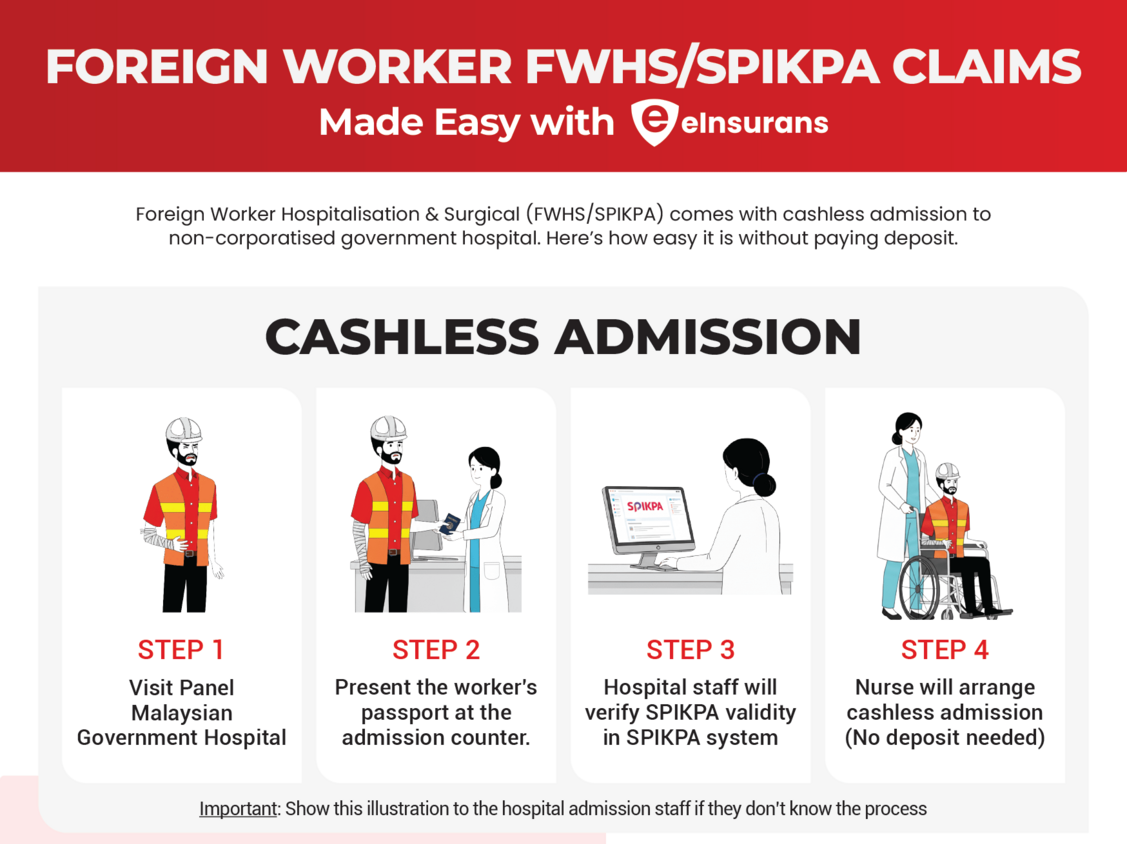
Step 1: Hospital Admission (Cashless Process)
When your foreign worker needs hospitalisation, bring them to any eligible government hospital in Malaysia.
At the admission counter, present the worker’s passport. The hospital will verify your worker’s SPIKPA coverage through the Ministry of Health SPIKPA system. No guarantee letter is required.
After verification, the hospital will manage the billing directly with the insurer’s designated third-party claims administrator. This constitutes the cashless process: your worker receives treatment without needing to make any upfront payments.
Heads up: Some hospitals may still request a deposit depending on the procedure. If that happens, keep every receipt. You can claim it back later.
Step 2: Collect Required Documents After Discharge
Once your worker is discharged, gather these documents as soon as possible:
- Completed SPIKPA claim form. You can download this from the MOH SPIKPA portal or obtain it from your insurer.
- Photocopy of worker’s passport and work permit. It must have both pages, clear and legible.
- Certified medical report from the hospital.
- Original hospital bill and receipt. Must show the hospital name and payment details.
Pro tip: Request the medical report on the day of discharge. Government hospitals can take 4 to 8 weeks to prepare it, so the earlier you ask, the faster your claim moves.
Step 3: Submit Your Claim
Submit all your documents to the insurer’s claims department, or send them through an authorised agent like eInsurans for faster processing.
Processing time: 7 to 14 working days after the insurer receives your complete documents.
Incomplete submissions will delay everything. Double-check that all receipts are originals and all copies are clear before you send them in.
Step 4: Receive Your Reimbursement
Once your claim is approved, the reimbursement will be processed and paid out. For your records and potential future audits, ensure you retain copies of all submitted documentation.
For detailed instructions on the purchase process, read our FWCMS insurance purchase guide.
Need SPIKPA IG for Your Workers?
Purchase your foreign worker insurance online in minutes through eInsurans. No paperwork headaches, no long queues.
Common Mistakes That Delay Your SPIKPA Claim
These are the pitfalls we see employers run into most often. Avoid them, and you’ll save yourself weeks of back-and-forth.
- Going to a private or semi-government hospital.
SPIKPA only covers non-corporatised government hospitals. Treatment at PPUM, UKM, UiTM, or any private hospital won’t be reimbursed. Not sure which hospitals qualify? Check the eligible hospitals list.
- Photocopied documents will get your claim rejected.
To ensure your claim is processed, the insurer requires the original hospital bills and receipts. Submitting photocopies of these documents will result in your claim being rejected.
- Waiting too long to request the medical report.
The processing time for government hospitals to prepare the required documents, such as final bills, detailed medical reports, and discharge summaries, typically takes about 4 to 8 weeks (around one to two months) from the date of discharge.
- Expired or unclear passport copies.
Expired or unclear passport copies can delay the claim process. Always keep updated and clearly legible copies of your worker’s passport and valid work permit on file to avoid documentation issues.
- Trying to claim for outpatient visits.
It is crucial to clarify that the SPIKPA is not designed to cover routine outpatient visits or non-emergency medical care. The scheme’s coverage is strictly and explicitly limited to inpatient treatment, meaning medical services that require the patient to be formally admitted to a hospital for a stay exceeding 24 hours.
Tips for a Faster and Smoother Claim
- Keep a folder for each worker with their passport copy, work permit, and SPIKPA policy details. When an emergency happens, you won’t waste time scrambling.
- Bookmark the eInsurans claims guide so your HR team can access it quickly during off-hours.
- Request the medical report immediately on the day of discharge; do not wait a week.
- Make sure every receipt is original and stamped by the hospital.
- Claims for workplace injuries resulting in permanent disability or death must be submitted through SOCSO’s Employment Injury Scheme, as these incidents fall outside SPIKPA coverage.
How to Purchase SPIKPA IG with eInsurans
If you haven’t purchased your SPIKPA IG yet, or your current policy is about to expire, here’s how to get covered online through eInsurans.
Since 1 February 2025, all foreign worker permit applications must go through the FWCMS system (Foreign Worker Centralised Management System). This means you’ll need a valid ITR number before you can purchase insurance.
Step 1: Generate Your ITR Number from FWCMS
Before purchasing insurance, you must generate an Insurance Transaction Reference (ITR) number from FWCMS. This unique code links your insurance purchase to your worker’s permit application.
1. Log in to the FWCMS website using your EPLKS@JIM ID credentials.
2. Navigate to the Purchase Insurance page and click Generate ITR No.
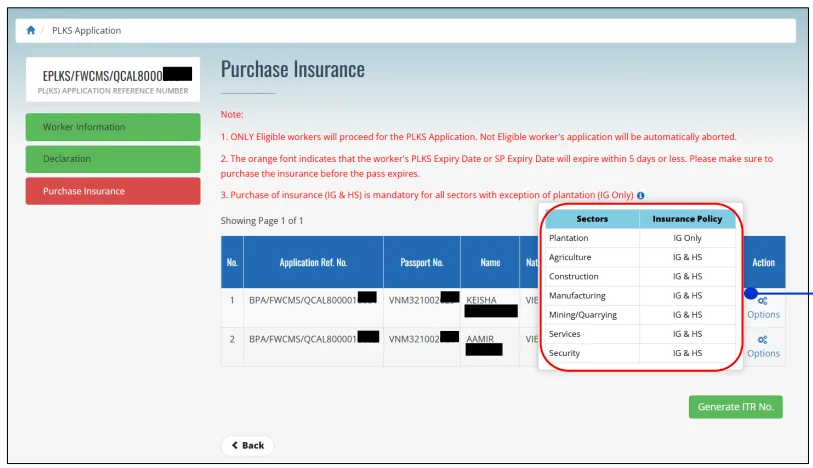
FWCMS
Note: The ITR number is only valid for 14 days. Complete your insurance purchase before the deadline to avoid restarting the process.
3. When prompted, select Offline Purchase Insurance – Self insurance purchase and click Proceed.
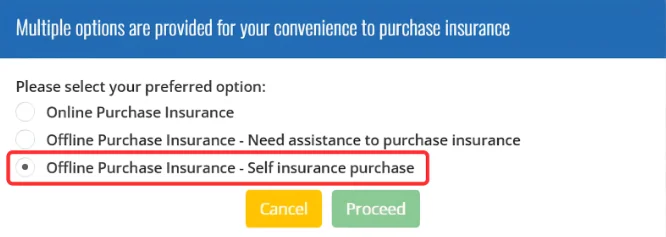
Remember: Select Offline Purchase Insurance (Self-purchase option) to buy from eInsurans. We’ll still be here to guide you and provide assistance!
4. FWCMS will send an email containing your ITR number to your registered email address. Copy this number as you’ll need it for the next step.
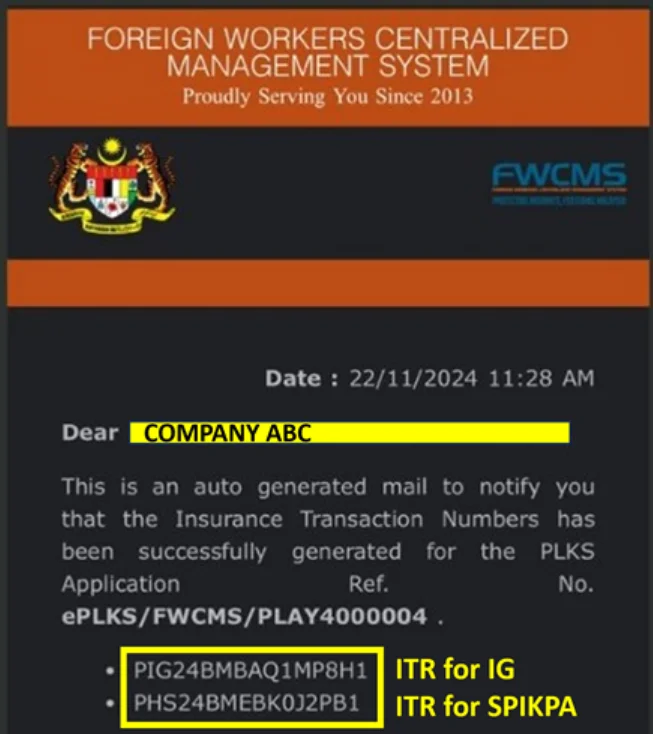
If you don’t receive the email, verify that your registered email in FWCMS is correct.
Purchasing SPIKPA IG is just one step in the permit renewal workflow. If you need clarity on the entire renewal timeline, including document requirements and payment steps, check out our step-by-step guide to renewing foreign worker permits in Malaysia.
Step 2: Access the eInsurans Portal
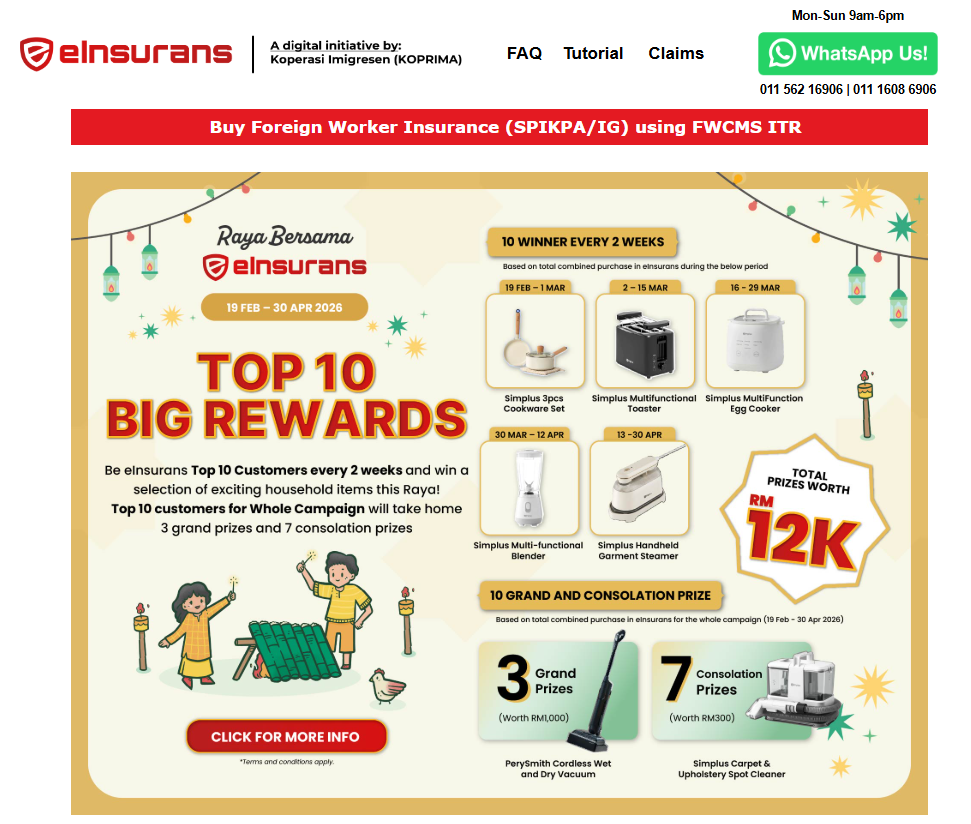
1. Go to the eInsurans Purchase Portal.
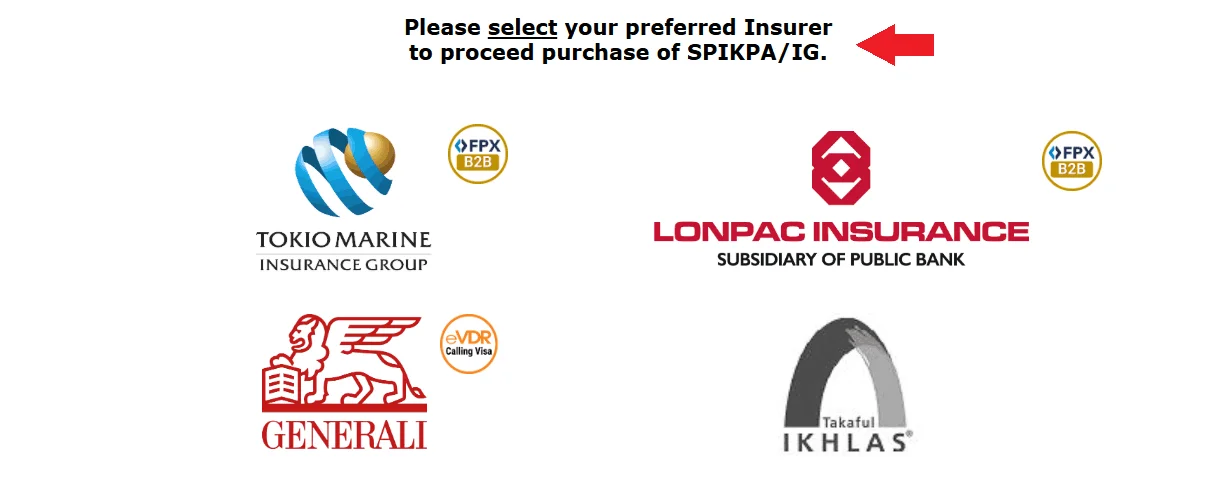
2. Select your preferred insurance provider from the available options.
3. Enter the following details in the form:
- ITR number for IG
- ITR number for SPIKPA
- Your SSM (Business Registration) number or Tax Identification Number (TIN)
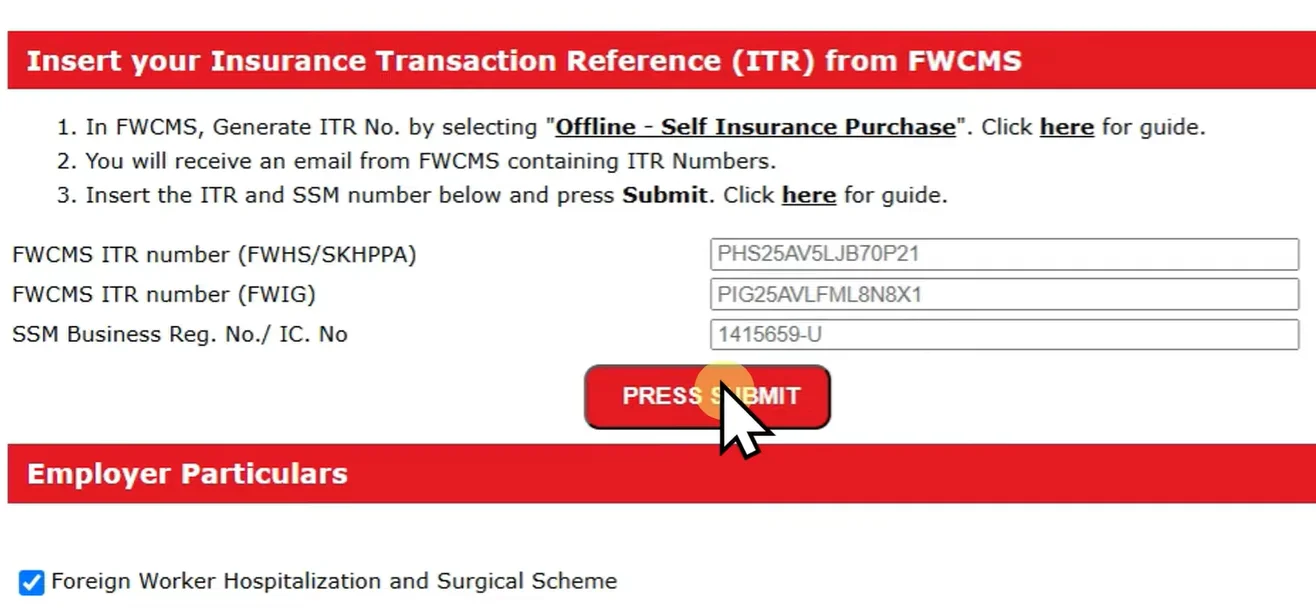
4. Click Submit. Your employer details will auto-populate from the ITR data.
When purchasing through eInsurans, you’ll notice two separate ITR numbers: one for IG and one for SPIKPA. These aren’t the same policy. If you’re unclear on what each covers and why both are required for permit approval, our guide on FWIG vs FWHS: Types of Foreign Worker Insurance Explained breaks down the differences.
Step 3: Enter Worker and Insurance Details
1. You’ll be directed to the Foreign Workers’ Hospital and Surgical Scheme section. Your employer and worker information will be auto-filled based on the ITR.
2. Under the Period of Cover section, set your insurance start date:
- For active permits: Set the start date to the day after the permit expiry date (Example: If the permit expires on 30/06/2026, set the start date to 01/07/2026)
- For expired permits: Select today’s date as the start date
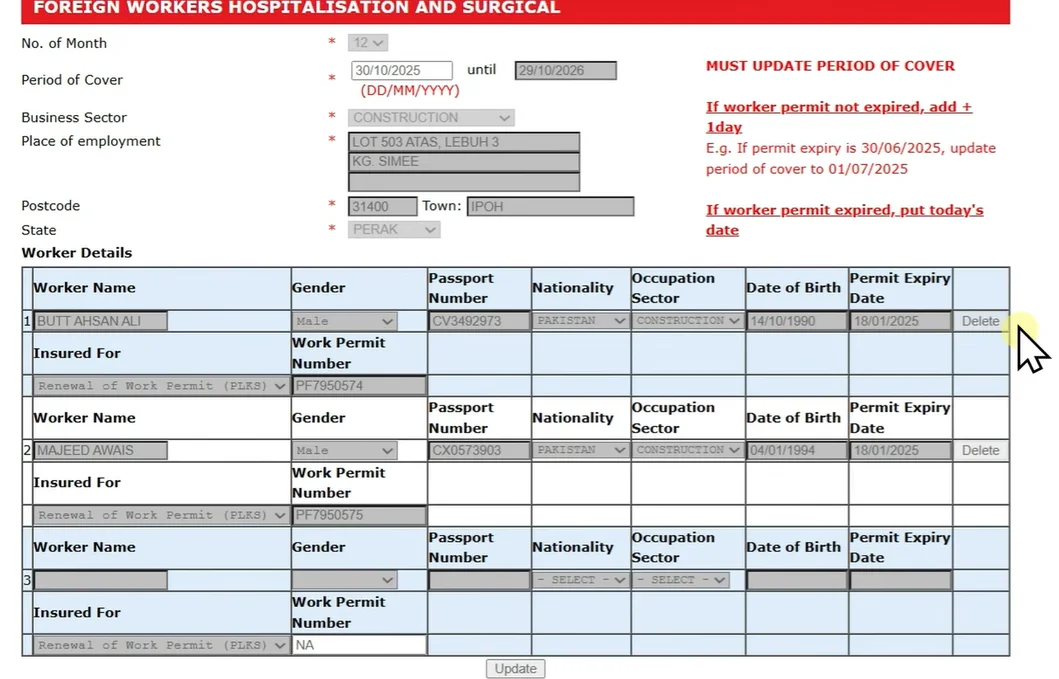
3. In the Immigration State field, select the state based on your business registration address.
Step 4: Complete Payment
1. Click Next, then Payment to proceed to checkout.
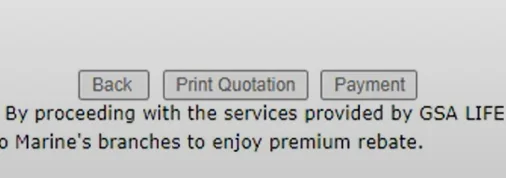
2. Choose your preferred payment method. eInsurans accepts:
- Credit/Debit Card
- FPX (Personal)
- FPX B2B (Corporate Banking)
3. Complete your payment.
Important: Do not click “Print Quotation” at this stage. Doing so will clear all entered data, and you’ll need to re-enter the ITR, SSM, Period of Cover, and Immigration details from scratch.
Step 5: Verify Your FWCMS Status
After successful payment:
- You’ll receive an email titled “Insurance Purchase Successful” with your policy documents attached. A copy is also available for immediate download.
- Your FWCMS status will update to one of the following:
- Insurance Purchased, or
- Pending JIM Approval
- Processing time is usually 10 minutes to a few hours.
If your status remains at “ITR Generated” after 10 minutes, contact eInsurans support via WhatsApp for assistance.
Once the status shows “Insurance Purchased”, your permit renewal process continues automatically in FWCMS.
For a more detailed walkthrough with additional screenshots, read our complete guide on how to purchase FWCMS foreign worker insurance via eInsurans.
Why Choose eInsurans
eInsurans is Malaysia’s reliable digital platform for foreign worker insurance. It has protected over 100,000 workers and served more than 8,000 employers.
What sets eInsurans apart:
- Automatic FWCMS Integration: Your insurance purchase syncs directly with the government system, so your FWCMS status updates to “Insurance Purchased” within minutes, not days.
- Always Online, Always Reliable: Powered by Financial Link, the insurance industry’s official FWCMS gateway provider, ensuring stable access even during peak renewal periods.
- Flexible Payment Options: Pay via credit/debit card, FPX, or FPX B2B for corporate accounts with maker-checker approval.
- Real Human Support: Get help from insurance specialists who understand both policy requirements and FWCMS workflows, available Monday to Sunday.
Purchase your SPIKPA IG today and keep your permit renewals on track.
Final Thought
Filing a SPIKPA claim comes down to four things: get your worker to the right hospital, keep the paperwork clean, submit everything promptly, and follow up.
The process is straightforward when you’re prepared. And when you’re not sure where to start, eInsurans is here to help, from purchasing your SPIKPA IG to walking you through the claims process.