A Complete Guide to Foreign Worker Permit Renewal in Malaysia 2026
Since February 2025, Malaysia has replaced the standalone ePLKS system with the Foreign Worker Centralised Management System (FWCMS), a fully digital platform integrated with digital insurance platforms.
Renewal of a foreign worker permit now involves several coordinated steps, including submitting worker details, verifying insurance coverage, making payments, and generating the ePASS. Accuracy and timeliness at each stage are important to avoid delays, penalties, or bond forfeiture.
This article will explain:
- How to submit a foreign worker permit renewal application through FWCMS
- Insurance compliance requirements for SPIKPA and Insurance Guarantee (IG) coverage
- Payment and ePASS generation procedures
- Tips to avoid common renewal challenges and maintain legal compliance
Foreign Worker Permit Renewal: Latest Updates
Foreign worker permit renewals in Malaysia have undergone major changes with the implementation of FWCMS. Employers need to be aware of the following updates for 2026:
- Full migration to FWCMS: All renewals must now be submitted through the centralised FWCS platform; as the old standalone PLKS system is no longer used.
- Instant digital compliance checks: Insurance and other required documents are verified automatically in real time; manual corrections are no longer possible.
- Centralised and secure process: Permit, quota, and insurance data are consolidated, improving transparency, reducing errors, and eliminating alternate submission channels.
- Mandatory insurance verification: Foreign worker permits require valid SPIKPA and Insurance Guarantee coverage at submission. Purchasing through integrated platforms like eInsurans links policies automatically to FWCMS, ensuring compliance and preventing rejection.
Who Should Renew the Permit
Under the FWCMS system, it is the employer’s responsibility to ensure foreign worker permits are renewed on time. This applies to all foreign workers employed in Malaysia, including licensed security personnel and foreign domestic workers (maids).
ePLKS Renewal Timeline
The foreign worker permit renewal must be completed via the FWCMS system at least three months before the expiration of the current PL(KS).
Processing Duration
The entire renewal process usually takes 2 to 4 weeks from payment completion to ePASS generation. However, the timeline may vary depending on:
- Application complexity and completeness
- Immigration Department workload and processing capacity
- Insurance verification status
- Sector-specific approval requirements
Applications requiring additional approvals, such as those for licensed security personnel (KDNK letters) or domestic workers, may experience longer processing times.
Supporting Documents for Foreign Worker Permit Renewal
For most foreign workers, including domestic helpers and employees in various sectors, employers do not need to upload any documents when renewing permits through FWCMS. The system already contains all the necessary information, making the process faster and simpler.
However, foreign worker permits require both FWHS (hospitalisation and surgical coverage) and FWIG (insurance guarantee) policies.
Special Requirements for Security Personnel
Security personnel have additional document requirements depending on their employment year:
- The Ministry of Home Affairs (KDNK) Approval Letter:
By knowing which documents are needed (and when), employers can avoid delays and ensure their renewal applications are processed smoothly.
ePLKS Renewal Procedure Overview
Foreign worker permit renewal under FWCMS follows a structured, system-led workflow. Employers must complete each stage in sequence, as applications only progress once all requirements are met.
The ePLKS renewal process involves four main stages:
- Application submission
- Insurance purchase and verification
- Payment to the Immigration Department
- ePASS generation
ePLKS Renewal Application Process
Employers must provide accurate worker details and ensure insurance compliance. FWCMS verifies information in real time and submits the application automatically to the Immigration Department. Follow these steps for a smooth renewal.
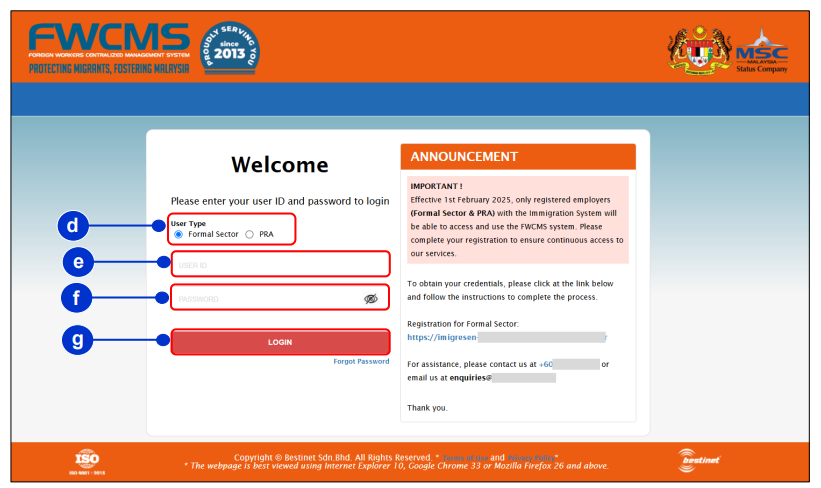
1. Login and select user type
You can log in to the Employer Portal website using your User ID and password and select Formal Sector under User Type section.
FWCMS
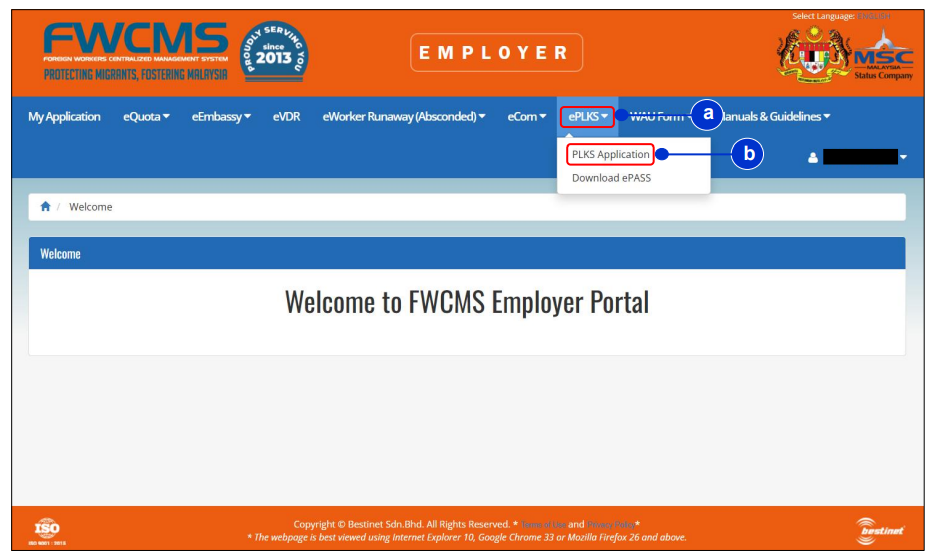
2. You will be redirected to the ePLKS landing page. Click the ePLKS menu and select PLKS Application tab to proceed with the renewal.
FWCMS
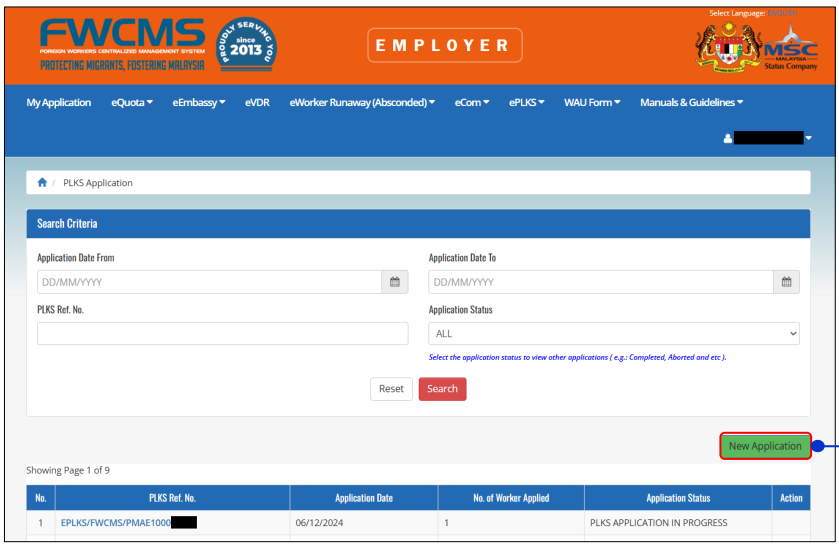
3. Click on New Application button to start the PLKS Application by worker inquiry status eligibility.
FWCMS
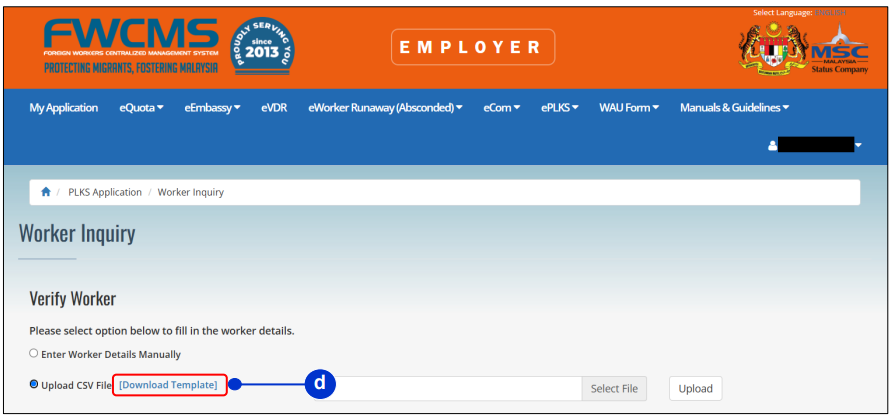
You can enter your employee’s details via two different ways:
- Option 1: Enter worker details manually
- Enter each worker’s Passport Number, Nationality, and Date of Birth.
- You can enter up to 10 workers at a time.
- Option 2: Upload CSV file
- Download the CSV template and fill in worker details in Excel.
- You can include up to 30 workers, but the system will only upload the first 10 workers from the list.
Upload your employees’ details then click on the Verify button to verify the worker eligibility.
FWCMS
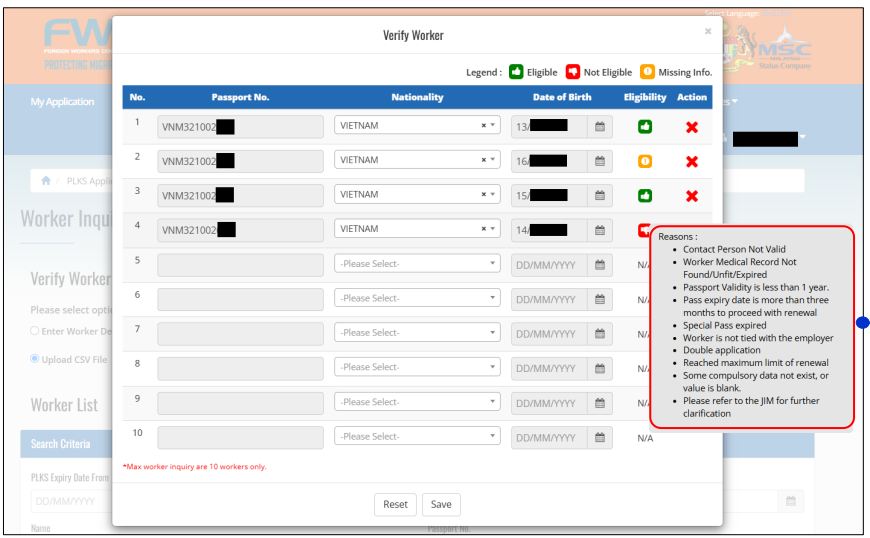
4. System verification
FWCMS checks and verifies each employee’s status and personal information. Hover on the legend in the Eligibility column to view your employees’ reasons for ineligibility or missing information.
Click on the Save button to save the employee’s information.
FWCMS
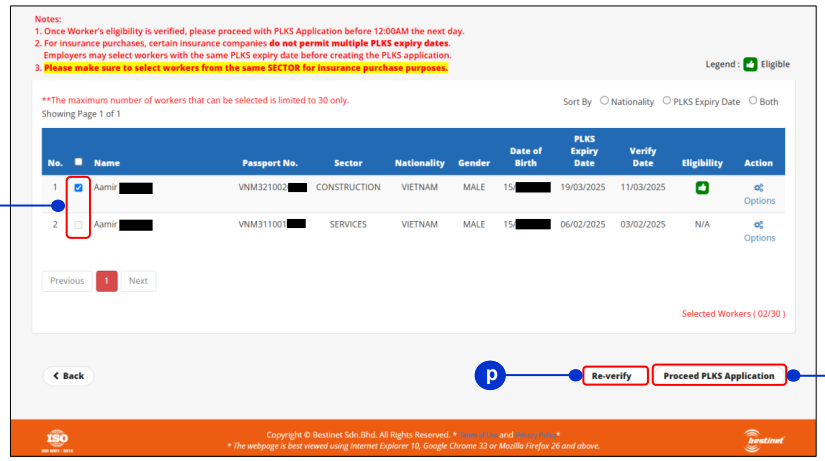
5. Selecting Workers for PLKS Renewal
Use the Search Criteria to find a worker by entering the required fields. You can also filter by Nationality and Sector. Select the eligible employee using the checkbox.
You can choose a single application or a bundle application. Then, click the Proceed PLKS Application button to continue.
If the application has expired after 12:00 AM the next day, click Re-verify to check worker eligibility again.
FWCMS
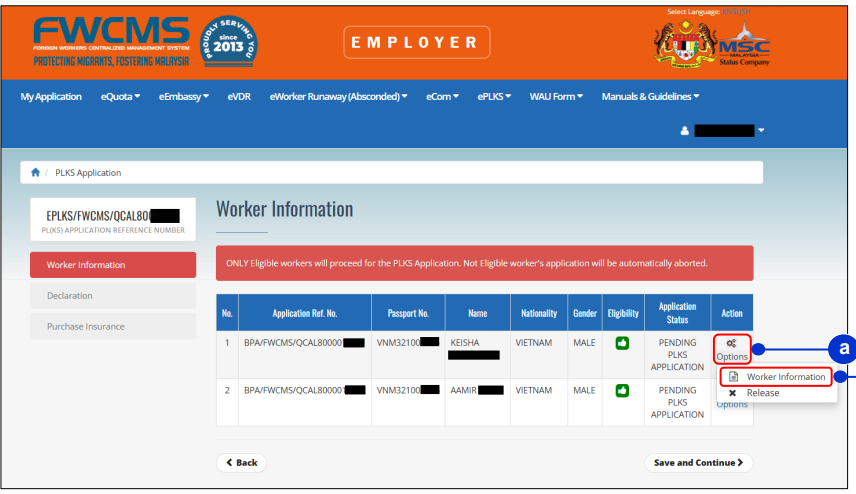
6. Worker Information and Document Upload
On the Worker Inquiry screen, click Proceed PLKS Application to open the Worker Information page. To view employee details, click Option in the Action column and select Worker Information.
Upload supporting documents, such as a Special Pass or Latest Pass, if available. This step is optional. Click Save and Continue to proceed to the Declaration page.
FWCMS
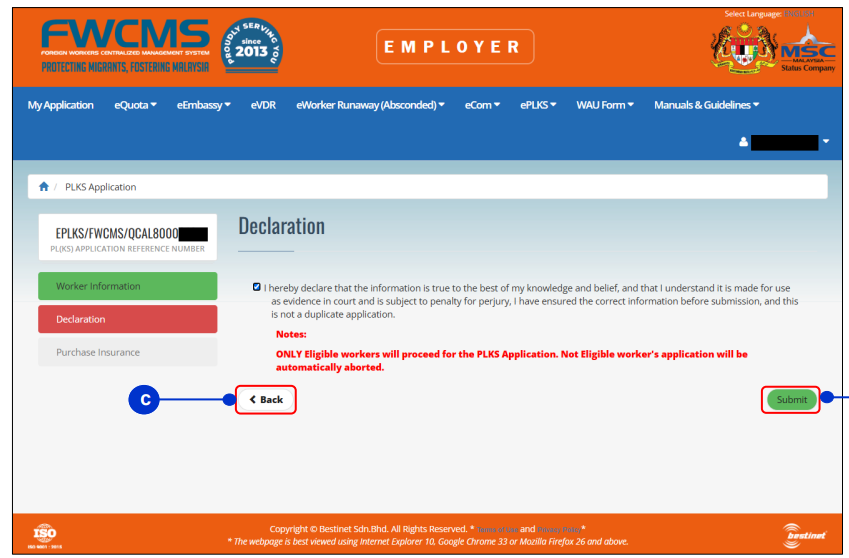
7. Declaration and Submission
Tick the Declaration checkbox to confirm that the information entered is true and valid. Then, click the Submit button to submit the PLKS application.
FWCMS
8. OTP Verification
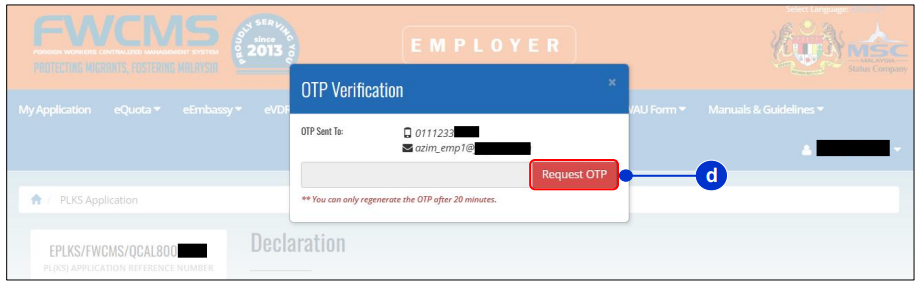
After clicking Submit, an OTP verification pop-up will appear. Click the Request OTP button to receive a One-Time Password via your registered email or mobile number.
FWCMS
Note: The OTP is valid for 20 minutes. If it expires, request a new one.
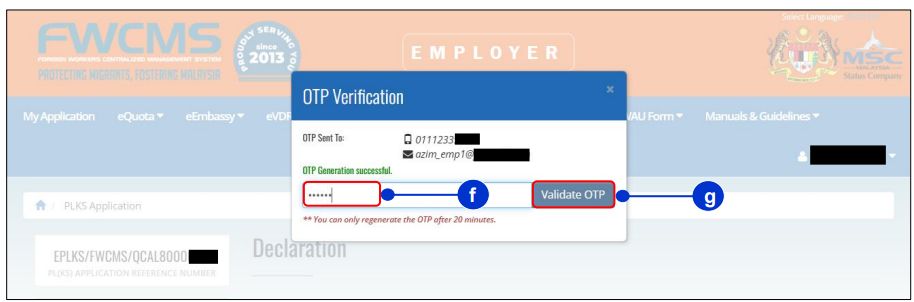
Copy the OTP from the email or message and paste it into the OTP Verification field. Then, click Validate OTP to confirm and proceed with the PLKS application.
FWCMS
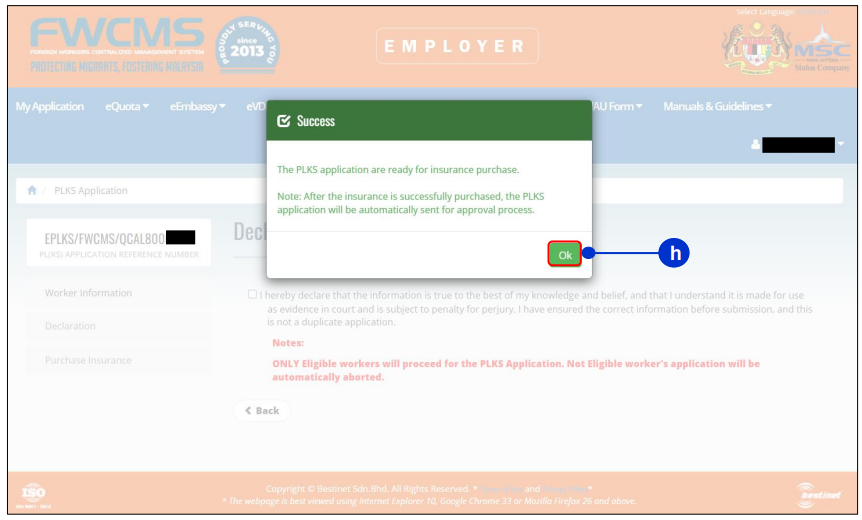
9. Success Notification
Once the application is successfully submitted, a success notification pop-up will appear. Click OK to proceed to the next step: Insurance Purchase.
FWCMS
Insurance Purchase
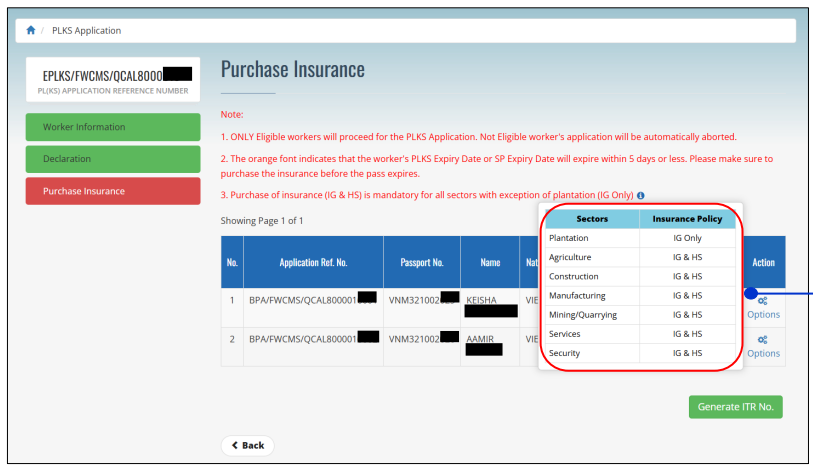
After submitting the PLKS application, employers must ensure each worker has valid SPIKPA and Insurance Guarantee (IG) coverage. Insurance details are linked automatically to the worker’s record for real-time verification.
1. You will be redirected to the Purchase Insurance page. Hover over the icons to view the insurance requirements for each sector.
FWCMS
2. You can select either an online or an offline insurance purchase method in FWCMS.
For eInsurans, choose Offline Insurance Purchase (Self insurance purchase).
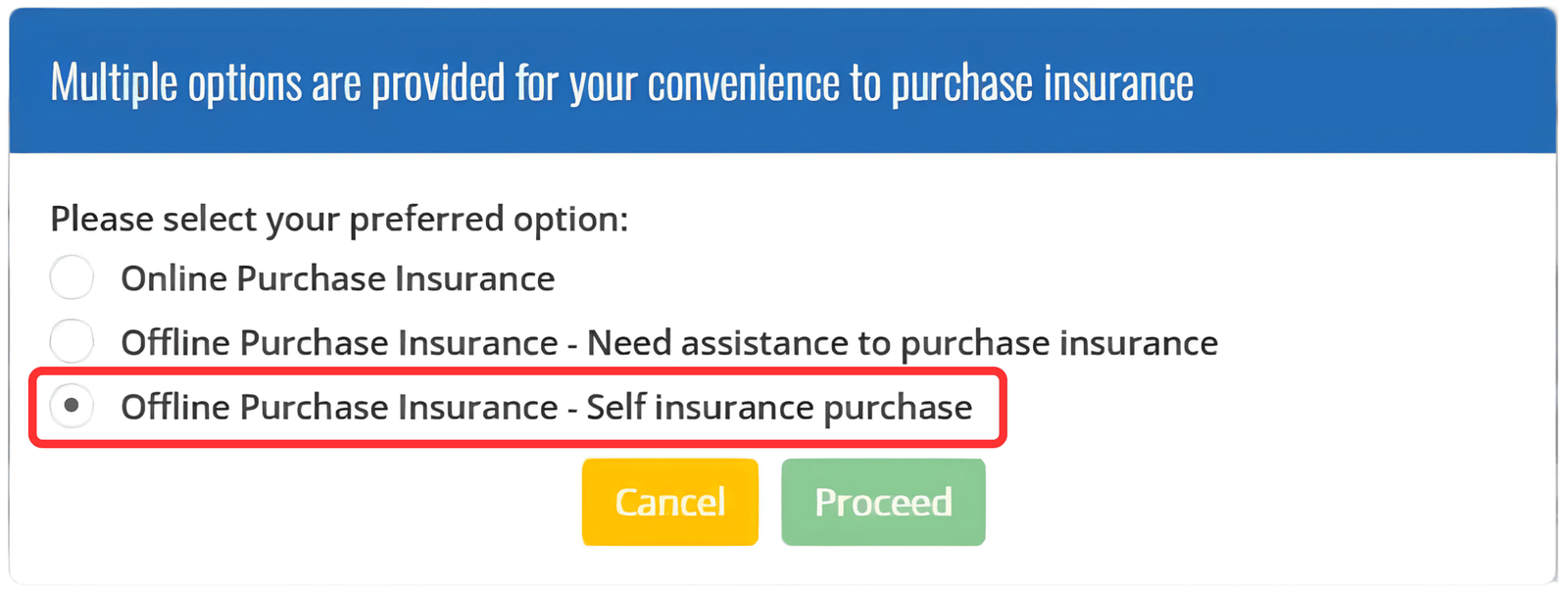
Important Note: Once a purchase option is selected, employers cannot switch to a different option.
3. Generate the ITR Number. The number is valid for 14 days.
4. Proceed to the eInsurans portal, key-in your ITR number and follow the on-screen instructions to purchase the insurance plan.
For detailed instructions, follow our step-by-step guide to purchasing insurance via the eInsurans portal.
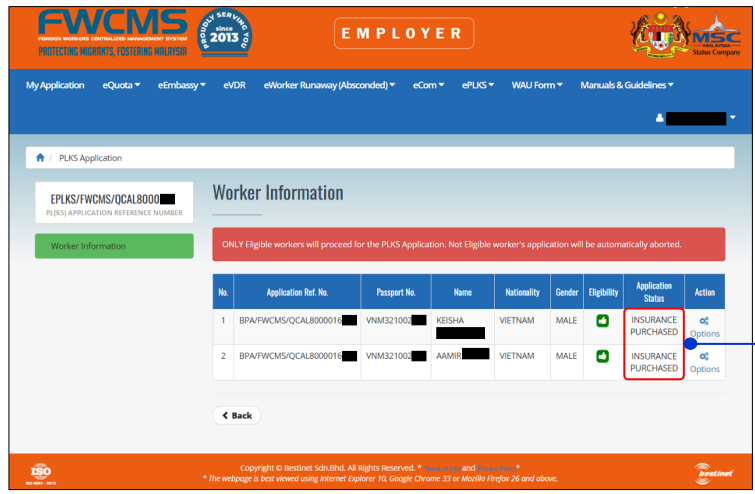
5. Once payment is completed and the policy is issued, FWCMS automatically updates the application status to confirm successful insurance verification.
FWCMS
Secure FWCMS-compliant SPIKPA IG coverage through eInsurans today for a fully integrated and hassle-free solution:
Trusted Foreign Worker Insurance Solutions
Digital SPIKPA IG insurance with seamless FWCMS integration, secure payments, and real human support.
ePLKS Renewal Payment Process
After insurance is successfully purchased, the application is submitted to the Immigration Department of Malaysia (JIM) for review and approval.
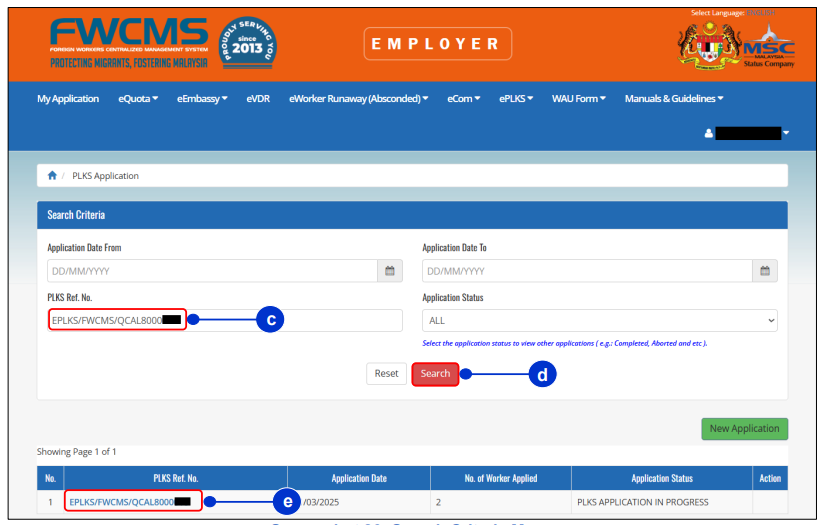
Employers will receive an email once the application is sent to the Malaysian Immigration System (myIMMs). Application status can be tracked in FWCMS using the ePLKS reference number.
FWCMS
1. Making the payment
Once approved by JIM, employers will receive an email with a payment link. Click the link to access the eBayaran (Immigration payment) portal.
- For bundle payments, search using your Registration of Company (ROC) number.
- For individual payments, search using the application reference number or the employee’s passport number.
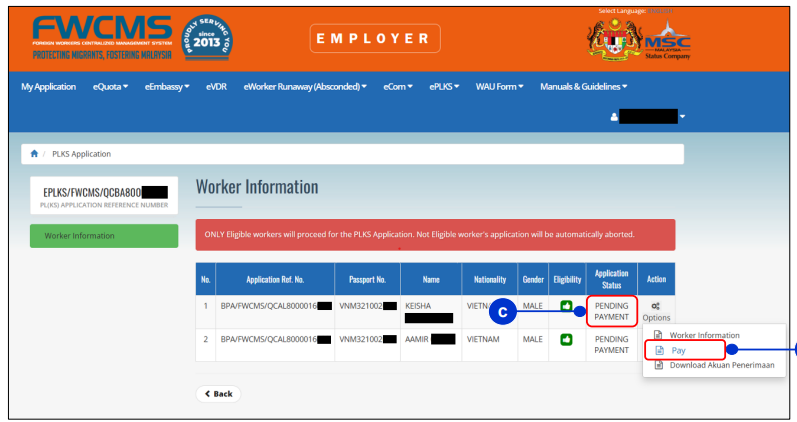
The application status will show PENDING PAYMENT in FWCMS. Complete the payment through the Immigration Department portal.
FWCMS
2. After payment
Once payment is completed, JIM will verify the payment and application data before proceeding to ePASS generation.
ePLKS ePass Generation Process
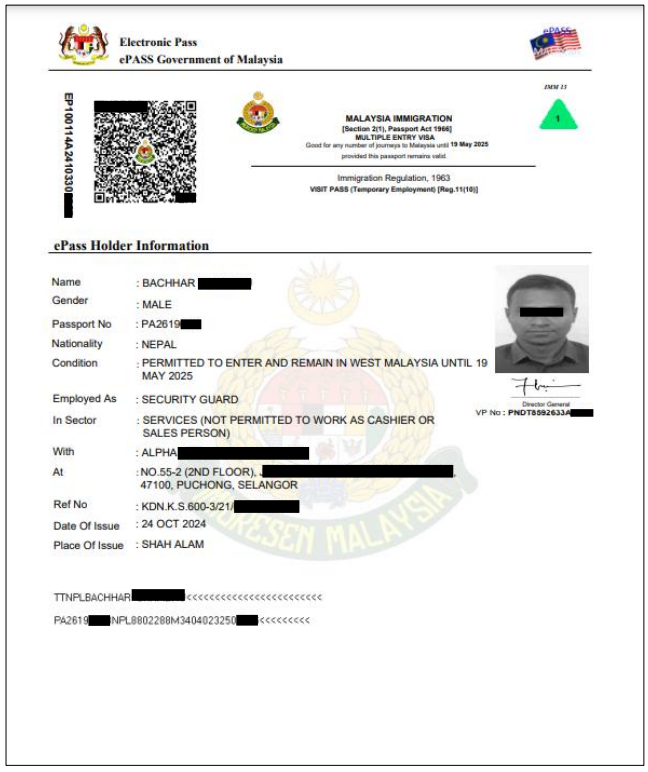
Once the data has been verified by the Data Quality team, the Immigration Department of Malaysia (JIM) will generate the ePASS, and the application status will update to Completed.
You can then download, save, or print your employee’s ePASS.
FWCMS
Fees for Work Permit Renewal
Renewing a foreign worker’s permit involves several costs that employers should budget for:
- Permit processing fees: Paid to the Immigration Department of Malaysia (JIM) via the eBayaran portal. Fees usually range from RM825 to RM2,035 per worker in 2026, depending on sector and worker type.
- Insurance premiums: Includes SPIKPA and Insurance Guarantee (IG) coverage, purchased online or offline.
- Additional administrative fees: May apply for sector-specific approvals, such as for licensed security personnel or domestic workers.
Employers should ensure all payments are completed promptly, as unpaid fees can delay the renewal process or prevent ePASS generation.
Common Pitfalls in Permit Renewal
Avoid these frequent mistakes that can delay or derail your renewal application:
- Start early: Submit renewals at least 3 months before expiry and set reminders 4 months in advance.
- Verify worker details: Check passport numbers, dates of birth, and nationality against original documents.
- Confirm insurance: Ensure SPIKPA and IG coverage is valid and shows “Insurance Verified” in FWCMS.
- Pay promptly: Complete Immigration Department payments within 24 to 48 hours of receiving the link.
- Follow document rules: Only upload required documents, such as KDNK letters for security personnel (years 4 to 13).
Compliance with Legal Requirements & Penalties:
Your Legal Obligations
Employers must:
- Submit renewal applications before permits expire.
- Maintain valid SPIKPA and IG insurance throughout employment.
- Keep accurate worker records, insurance certificates, and ePASS documentation.
- Comply with sector-specific rules (such as KDNK approvals for security personnel or domestic worker regulations).
- Complete all Immigration and insurance payments promptly.
Consequences of Non-Compliance
Failing to meet FWCMS requirements can lead to:
- Financial penalties: Fines, bond forfeiture, and reprocessing fees.
- Operational disruption: Workers cannot legally work, causing staff shortages or project delays.
- Immigration consequences: Worker repatriation, prosecution under the Immigration Act, difficulty securing future quotas.
- Business impact: Licensing, government contracts, and regulatory reputation may be affected.
Employer Preparation Checklist
Get FWCMS-Compliant Insurance Renewal with eInsurans
Insurance compliance is a critical step in renewing foreign worker permits under FWCMS. eInsurans simplifies this process by offering a single, fully integrated SPIKPA IG solution that combines Foreign Worker Hospitalisation and Surgical Insurance (SPIKPA) with the Insurance Guarantee (IG).
Why employers choose eInsurans:
- FWCMS-ready integration: Insurance data is automatically linked to the Immigration system for real-time validation.
- Fully digital process: Policies are purchased, issued, and managed online with clear documentation and traceability.
- Single-bundled solution: Both SPIKPA and IG coverage are secured in a single transaction, reducing errors and approval delays.
For employers renewing foreign worker permits in 2026, valid, system-recognised insurance is essential. Secure SPIKPA IG coverage through eInsurans today to ensure smoother approvals, minimise the risk of costly rejections, and keep your workforce compliant.