
Buying Foreign Worker Insurance Online vs Agent: Which Is Better?
You just started the renewal of your foreign worker permit through FWCMS. Everything is smooth until you realise you still need to purchase the mandatory foreign worker insurance before the permit process can move forward.
Now you’re staring at two familiar options:
- Call or WhatsApp your insurance agent and wait for them to handle it, or
- Enter your ITR and SSM numbers and purchase it online through platforms like eInsurans.
Both are valid. Both are compliant. But they deliver very different experiences.
Since 1 February 2025, Malaysia’s Foreign Worker Centralised Management System (FWCMS) mandate means all foreign worker insurance purchases must be processed through the official system.
Whether you use an agent or an online platform, the purchase ultimately flows through FWCMS, the real difference is who does the clicking, who controls the timeline, and how much visibility you have.
This guide compares agent-assisted vs self-purchasing foreign worker insurance digitally across cost, time, control, and compliance, so you can confidently choose the option that fits your business needs.
Understanding the Mandatory Insurance Requirements
Before comparing purchase methods, it’s important to understand what you’re actually buying.
For most foreign workers in Malaysia, employers are required to purchase:
- FWHS/SPIKPA: Hospitalisation & Surgical Insurance Scheme
- RM120 per worker (excluding SST and stamp duty)
- RM120 per worker (excluding SST and stamp duty)
- FWIG / IG (Foreign Worker Insurance Guarantee) or equivalent
- Pricing varies based on worker nationality and policy terms
These policies are not optional. Without them, your worker’s permit cannot be issued or renewed in FWCMS.
We go more in-depth in this article on the types of foreign worker insurance.
Understanding Your Two Options: Agent vs Buying Insurance Online
Under the FWCMS framework, there are now two primary ways employers complete the insurance step.
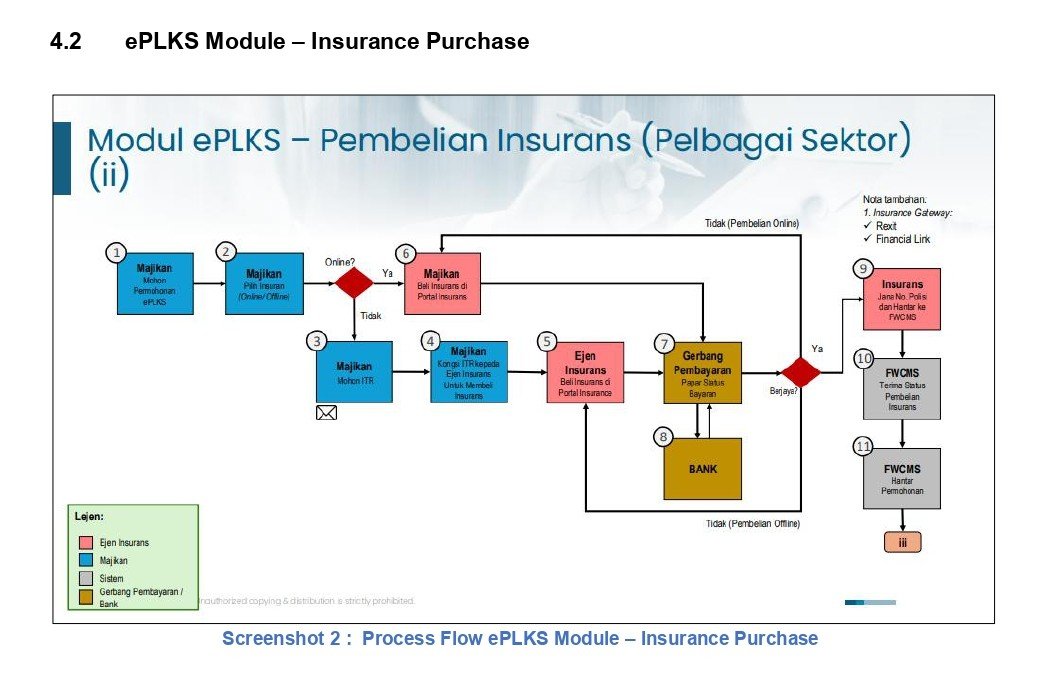
What Agent-Assisted Purchase Looks Like
This is the traditional, relationship-based approach many employers are familiar with.
Process flow:
- Log in to FWCMS and start renewal application
- System generates an ITR (Insurance Transaction Reference) number
- Select Offline Purchase Insurance – Self insurance purchase
- Contact your insurance agent and share the ITR number obtained via email
- Agent manually issues the insurance on your behalf
- Complete payment directly to the agent
- The insurance system updates your status in FWCMS online
Key characteristics:
- Human-led, consultative process
- Agent handles documentation and troubleshooting
- Familiar for employers who prefer personal guidance
📌 Note: If you would like eInsurans to be your insurance provider, please select “Offline Purchase Insurance – Self Insurance Purchase.”
What Insurance Self-Purchase Looks Like
This is the newer, self-service approach enabled by digital insurance platforms such as eInsurans.
Process flow:
- Log in to FWCMS and start renewal application
- System generates an ITR (Insurance Transaction Reference) number
- Select Offline Purchase Insurance – Self insurance purchase
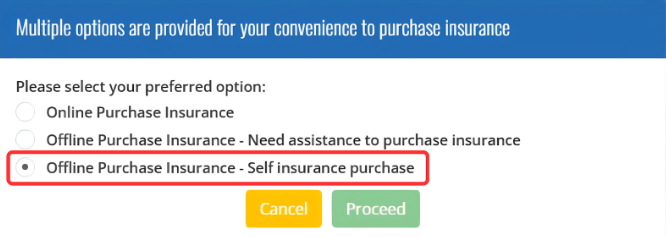
- Proceed to the eInsurans portal
- Select your preferred insurer
- Complete the payment
- eInsurans automatically updates your status in FWCMS
Key characteristics:
- Self-service with digital support tools
- 24/7 access with no reliance on an agent
- Full visibility of status and documents
- Faster, on-demand completion
Important clarification:
Both methods use the ITR number obtained from FWCMS to purchase insurance externally, either via an agent or through eInsurans . Once successful, the insurance system automatically updates FWCMS.
The difference lies in control, transparency, speed, and who manages the technical steps.
Interested to learn more? Read this step-by-step guide on how to purchase FWCMS Foreign Worker Insurance via eInsurans.
Trusted Foreign Worker Insurance Solutions
Digital SPIKPA IG insurance with seamless FWCMS integration, secure payments, and real human support.

Time & Convenience: Who Delivers Faster?
For most employers, time is the deciding factor.
Agent-Assisted Timeline
Typical flow:
- Submit documents to agent
- Wait for agent availability
- Agent processes insurance
- Receive confirmation
Average completion time: Within the same business day during working hours
Common delays:
- Agent office hours
- Peak renewal periods
- Back-and-forth clarifications via WhatsApp or phone calls
Renewal reminders:
- Often handled via calls or WhatsApp messages
- Helpful for some, intrusive for others
eInsurans Platform Timeline
Typical flow:
- Go to eInsurans website→ select insurer → pay → confirmation
Average completion time: 2–3 minutes
Availability:
- 24/7 access
- Includes weekends and public holidays
Real-world scenario:
Your worker’s permit renewal is in three days, and it’s Saturday evening. With eInsurans, you can complete the purchase immediately. With an agent, you’ll likely wait until Monday morning, risking permit processing delays.
Convenience Factors: Why enInsurans Wins
- No appointment scheduling
- No phone tag or WhatsApp back-and-forth
- Quick and easy online purchase in just a few clicks
- Dashboard shows all workers’ policy status at a glance
- Instant email confirmation for insurance document
- Policy documents available for immediate download after payment
Technical Support: Can You Handle FWCMS Yourself?
FWCMS is a powerful system, but not always intuitive. Employers often worry about making mistakes.
Common Technical Hurdles
- ITR generation errors (duplicate passport numbers, expired permit references)
- FPX payment gateway timeouts
- FWCMS status stuck at “ITR Generated”
Agent Advantage
- Experienced with common FWCMS error codes
- Knows escalation paths and workarounds
- Handles communication with FWCMS support
- Ideal for first-time employers or complex cases
eInsurans Platform Support
Modern platforms are built to reduce friction, not add to it.
- Step-by-step guides with screenshots
- Live chat support during business hours (9am–6pm)
- Comprehensive help centre with error-code explanations
- Video tutorials for visual learners
- Faster response than waiting for agent callbacks
The truth:
Using eInsurans makes completing worker permit renewals on FWCMS easier by guiding you step-by-step, reducing errors, and letting you complete your policy purchase quickly, streamlining the end-to-end renewal process for foreign workers without needing agent support.
Who Should Choose Which Option?
Choose an Agent If:
- You’re hiring your first foreign worker
- You’re uncomfortable with digital systems
- You want end-to-end hand-holding
- Your case involves unusual documentation issues
Choose eInsurans If:
- You’re comfortable with digital platforms
- You value speed and control
- You manage three or more workers
- You want visibility across multiple policies
Foreign Worker Insurance: Self-Purchase vs Agent Comparison
| Aspect | eInsurans Platform | Agent |
|---|---|---|
| Time efficiency | Instant completion | Within business hours in same working day |
| Consultation | Self-guided with support resources | Personal consultation |
| Decision-making | Full control | Agent-led pacing |
| Access to insurers | Multiple insurers to compare | Usually limited to agent’s panel |
| Ease of renewal | Automated reminders | Manual reminders via calls/messages |
| Paperwork management | Digital storage (Immediate download and email confirmation) | Documents sent manually |
Final Thoughts: Which Is Better?
There is no universally “better” option, only the option that fits your operational style.
- Agents excel at personal guidance and problem-solving for first-timers.
- Self-purchase digital platforms excel at speed, transparency, and scalability.
As compliance becomes more digital and time-sensitive, many employers are shifting toward self-service platforms to reduce delays and gain control, especially when managing multiple foreign workers.
Buy Foreign Worker Insurance With eInsurans
At eInsurans, we provide comprehensive insurance solutions for foreign workers, such as FWIG/IG and FWHS/SPIKPA.
Why Choose Us?
- Auto FWCMS status update: Our system is linked with the FWCMS Gateway. After payment, your FWCMS status will change to “Insurance Purchased”.
- Always online, always reliable: We are online 24/7, providing a stable and reliable e-commerce platform for your peace of mind.
- Secure and flexible payments: You can pay with a credit or debit card, FPX personal, and FPX B2B Corporate Banking for your convenience.
- Fast support, real people: Get quick support from our experienced team that understands your struggles and needs (no chatbots, no delays).
Need Foreign Worker Insurance?
With eInsurans, you can complete your purchase entirely digital for a fast, self-guided experience.
Prefer the full benefits of agent-assisted support? Our helpline is also available to guide you through every step. Whatever option you choose, our team ensures your foreign workers are fully covered.